A command item becomes a command only after you attach a procedure or an I/O Table. Since the driver MyDMM uses I/O Tables, attach them to its command items.
1. Select the Function command item in the Command Items view.
2. Select IO Tables from the Procedures combo-box. The available I/O tables are displayed in the list below.
3. Select SetFunction from the procedures list.
4. Click Attach Procedure. The Procedure is now displayed next to the command item in the command items view.
5. Repeat steps three and four for the VDC, VAC and Measure command items.
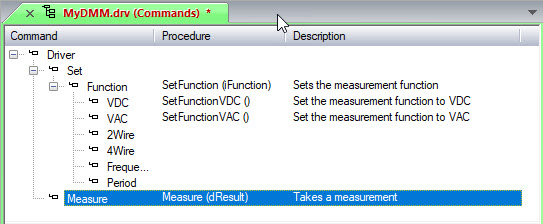
The Commands view should look as shown here:
Four commands were created:
Set Function (iFunction)
Set Function VDC
Set Function VAC
Measure (dResult)