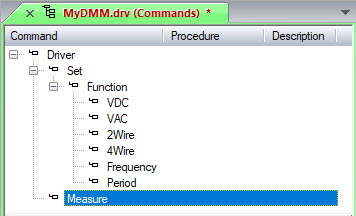
Double-click on the Commands submodule under MyDMM in the Workspace window. The Commands view is displayed.
Right-click on Driver and
select Insert Command Below
 from the context menu. A new command item is
inserted called Untitled1.
Type Set in the edit box to
rename the command item.
from the context menu. A new command item is
inserted called Untitled1.
Type Set in the edit box to
rename the command item.
Repeat step 2 and insert a new item below Set. Rename it Function.
Repeat step 2 and insert six items below Function. Rename them VDC, VAC, 2Wire, 4Wire, Frequency, and Period.
Create an additional item below Driver. Rename it Measure.