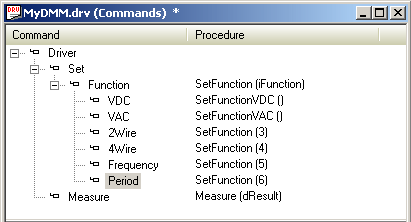
When attaching procedures with parameters to command items, you can replace the parameter with an argument. The argument you specify will be used instead of the parameter and the command will not require the user to supply an argument. Parameters are usually replaced with literals that you supply but can also be replaced with variables that you define.
In the following example you will use the SetFunction I/O Table to implement the remaining commands under Set Function: 2Wire, 4Wire, Frequency, and Period.
1. Attach SetFunction to the 2Wire command item.
2. Select the iFunction text in the Parameter Replacement edit box (at the bottom of the commands view) and type 3 to replace the text. The command items view is automatically updated to display SetFunction ( 3 ).
3. Repeat steps one and two for 4Wire, Frequency, and Domain and use 4, 5, and 6 respectively.
The commands view should look as follows:
Four commands were created:
Set Function 2Wire
Set Function 4Wire
Set Function Frequency
Set Function Period