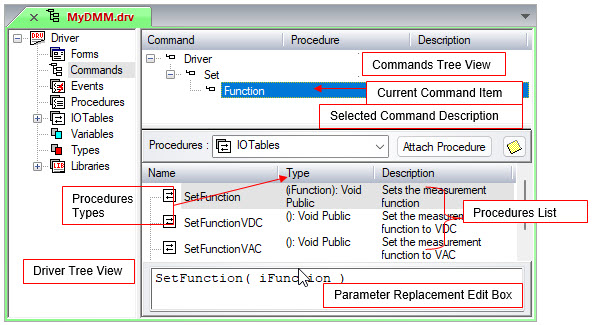
The Commands view is used to create and edit commands. An example this view is shown below:
The left pane of the Commands View shows the module's tree (in this case, the Driver Tree View). The top right pane of the Commands View shows the Commands Tree View listing all the available command items. The highlighted command item in this view is the Current or Selected Command Item (Function Here). Below the commands tree is a textbox for the selected command item description. Below this textbox, there is a drop down list on the left listing the available procedure types (for example, I/O Tables, DLL procedures). To the right of the list box, the Attach/Remove procedure button allows you to attach or remove procedures to/from the current command item.
In the pane below the procedure types is the Procedures List of the available procedures for the selected procedure type. The default procedure type for all ATEasy modules (that is, driver, system, and program) is Procedures (local procedures).
The bottom pane displays the currently selected procedure. This is the Parameter Replacement Edit Box where you may substitute values for parameters in a procedure, so the user will not need to enter them when using the command.
The Commands View is almost identical for Drivers, System, or Programs. The only difference is the type of procedures available to each. All have local procedures, the ATEasy Internal Library procedures, as well as any other library linked to that module. The Driver's Commands View also adds I/O Tables to the list of available procedure types as only ATEasy drivers have I/O Tables.