from the Standard toolbar or select Properties from the View
menu. When the properties window appears, click the Interfaces
tab.
from the Standard toolbar or select Properties from the View
menu. When the properties window appears, click the Interfaces
tab.The driver interface to be created is a GPIB driver. You will be adding this interface to the MyDMM driver you created.
1. Select the driver in the document view and either
click the Properties command from the Standard toolbar or select Properties from the View
menu. When the properties window appears, click the Interfaces
tab.
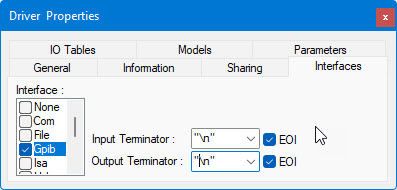
2. Check the Gpib Interface in the list box to add GPIB support to this driver. As shown below, select the LF (Line Feed or "\n") for the input and output terminator. Also, select EOI to identify the end of transmission.
3. Uncheck the None interface, to make the GPIB interface the only interface supported by this driver.
The driver Interfaces property page should look like the following dialog: