 from the View
menu or from the Standard toolbar. The properties window appears displaying
the Driver Properties:
from the View
menu or from the Standard toolbar. The properties window appears displaying
the Driver Properties: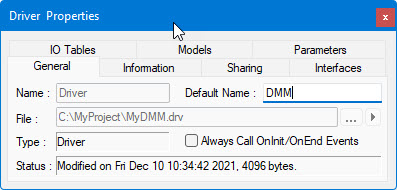
The driver default name usually indicates the type of instrument this driver accesses. For a digital Multimeter, use DMM. This name is used when you add the driver to a system as the default identifier name. It is used to identify the driver in your system programmatically.
1. Select
Driver in the MyDMM document view
and select Properties from the View
menu or from the Standard toolbar. The properties window appears displaying
the Driver Properties:
2. Type DMM in the Default Name edit box.