Using IVI Drivers |
Version 5 |
The IVI standard for instrument drivers was created by the IVI Foundation http://www.ivifoundation.org. The foundation defined generic, interchangeable programming interfaces for common instrument classes. Currently the following IVI drivers were released by the IVI foundation: DC power supply, Digital multimeter, Function generator & Arb, Oscilloscope, Power meter, RF signal generator, Spectrum analyzer and Switch. IVI drivers are based on VXI Plug&Play drivers, and they require VISA and the IVI libraries that are provided by the IVI foundation members to be installed prior to using them. The drivers offer the same functions and parameters to different instruments of the same type (i.e. DMM) from different vendors. For example, it allows you to replace Keysight 34401A with a Keithley 2000 DMM in your system without changing your code. ATEasy provides built-in support for these drivers and provides ATEasy drivers for all the above IVI drivers.
1. Before using the driver you must install the instrument manufacturer IVI driver. The IVI engine uses this driver to control the instrument.
2. Configure the driver's address and its logical name using the IVI configuration utility such as National Instruments Measurement & Automation Explorer. The Logical Name which is used to identify the instrument and entered by you (in that utility, the logical name must be displayed below IVI Drivers/Logical Names and the manufacturer IVI instrument driver should be link to that logical name and appears under IVI Drivers/Driver Sessions which also contain the instrument address, if you don’t see IVI Drivers in that utility IVI engine is not properly installed). The instrument address is a VISA resource name (see earlier in this chapter).
3. Select Insert
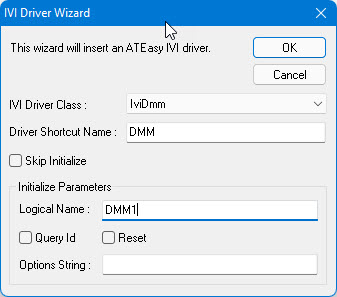
IVI Driver… command from the Insert menu. The IVI Driver Wizard is displayed
as shown here:
4. Select the IVI class from the list.
5. Type in the driver's shortcut name.
6. Type in the instrument Logical Name as explained above.
Programming using ATEasy IVI drivers is like Function Panel imported drivers. ATEasy provides several examples for the various IVI classes; the IVI workspace file Ivi.wsp contains these examples.