 on the context menu. The Procedures View
opens displaying as shown here:
on the context menu. The Procedures View
opens displaying as shown here: 1. Select Procedures from the Tree View.
2. Right click on Procedures and select Insert
Procedure Below
on the context menu. The Procedures View
opens displaying as shown here:
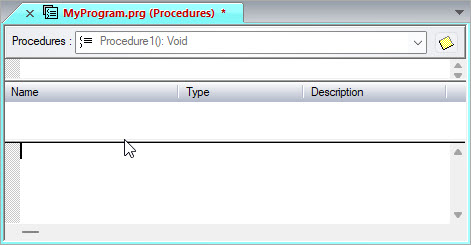
The Procedures view display the module procedures in a combo box on the top of the view. Below is an area where the procedure description can be entered. The procedure parameters and variables area follows this, and the procedure code area is displayed at the bottom of the view.
The procedures combo box displays the available procedures and is used to select the current procedure. The other areas display the current procedure description, variables, and code.
Procedure1 is the newly created procedure. It is the current procedure. The return type was set to Void indicating the procedure does not return any value and is therefore a subroutine.