 Import C Header File (.h)…
 Declaring procedures, types and constants
manually can take considerable time. ATEasy
can make use of the C header file supplied with DLL to import procedures,
types (struct, enum or typedef) and constants. C data types that are specified
in a header file can have various interpretations. For example the C data
type ‘unsigned int *’ when specified as a procedure parameter can be interpreted
as a parameter that returns a DWord (Var DWord) or array of DWord (Var
DWord []) or accept array of DWord (val DWord []). During the Import process
ATEasy will
ask the user to resolve Ambiguous data types by presenting the possible
options. Selecting the right option is essential.
In the following example we will be using the Gx6138.h
as an example for importing a C header file. The file was extracted from
GXSW.h that is part of the GXSW
package that can be installed from Marvin
Test Solutions web site. The Gx6138.h file is installed by ATEasy in the
Examples folder.
1. Create a new driver by right click on the system from the workspace window and select New Driver
2. Under libraries insert GXSW.DLL as explained earlier in this chapter.
3. Right click on GXSW DLL under procedures and select
Import C Header File (.h)…
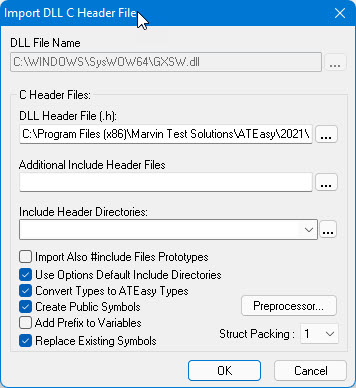
4. Select the Gx6138.h
from the ATEasy Examples folder and check the following options as shown
here:
The Additional Header Files (.h):
is used when you need to specify additional header files needed to import
(separated by semicolons). The Include
Header Directories is used to specify include directories that
are needed when trying to resolve data types defined in other header files.
The preprocessor button displays a header file that contains common definition
and always parsed before the actual header file. This file can be edited
to add or change types. The other options are documented in the On-Line
help.
5. Click OK to import the header file.
6. ATEasy
will prompt with the following Ambiguous C Type dialog:
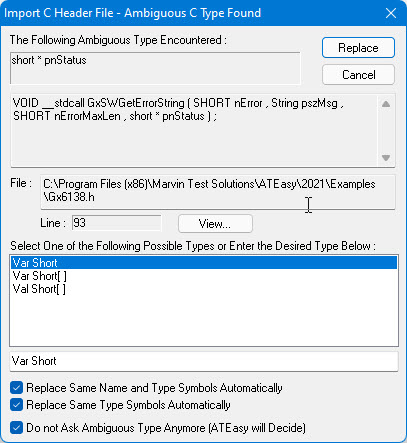
This dialog will be displayed for each C data type that ATEasy cannot find exact match. In this
case the PSHORT data type is offered
with 3 options Var Short and two
array types. Since the status is returned from the procedure as a single
number and not an array select the Var
Short. To accelerate the migration, check Replace
Same name/same type and Don’t
ask check boxes as shown here and click Replace.
The newly created GXSW library will now be created and will show similar procedures to the one declared manually earlier in this chapter. You can remove the new driver created from the system.