ATEasy allows you to use National Instruments LabVIEW® Virtual Instrument Files from within your application. The two available file types are supported: VI file that holds a single Virtual Instrument panel and LLB that holds multiple VIs.
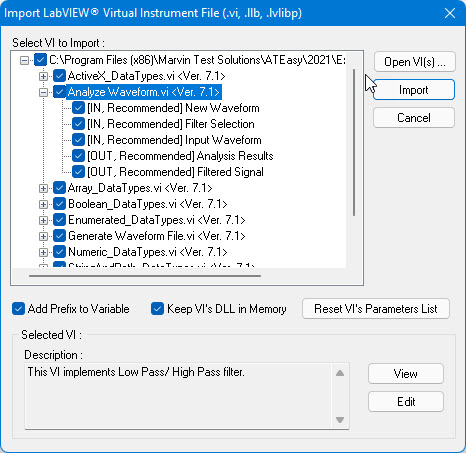
To use a VI you must import it first using the Import LabVIEW Virtual Instrument File (.vi, .llb)… command . Once you import the LLB or VI files ATEasy will create a procedure for each one of the VI that was imported. These procedures contain code that is using the ATEasy internal function GetVi that returns a LabVIEW ActiveX object used to call the VI. ATEasy supports VI's created with LabVIEW versions 7.0 or newer (see the ReadMe.txt for more information about the latest version currently supported). You must also have a matching version of the VI you are using (including referenced Vis) and the LabVIEW run-time version in your machine. The LabVIEW development environment is not required to call the VI, however if exist, it will allow you to Edit the VI from (see image below). The procedures created by the wizard contain parameters as required by the VI. Calling these procedures is similar to calling any ATEasy procedures. See the GetVi internal function for more in-depth detail of how ATEasy runs the imported LabVIEW VIs at run-time.
The LabVIEW.prj and the LabVIEW.llb in the ATEasy Examples folder provides an example for using LabVIEW. The following dialog displays the Import LabVIEW Virtual Instrument File dialog importing the LabVIEW.llb provided with ATEasy: