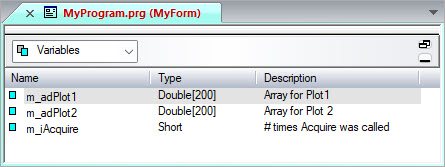
Add a form variable to a form just as you do with any other module. You will add three variables, two arrays, and one integer that stores the number of times the user clicked the Acquire button.
1. From the form view, select Variables from the form items combo box. The view below now shows a variables view.
2. Right-click on the variables view and insert the following variables and properties:
Name |
Type |
Dim |
Dim Size |
Description |
m_adPlot1 |
Double |
1 |
200 |
Array for Plot1 |
m_adPlot2 |
Double |
1 |
200 |
Array for Plot2 |
m_iAcquire |
Short |
0 |
n/a |
#times Acquire was called |
Note the m_ is used to tell the user that the variable is a member variable of the form.
Your variables view should look similar to the following: