As discussed earlier, the output of the test is a single measurement result. This result should be stored in an ATEasy built-in internal variable called TestResult. Upon completion of a test, ATEasy automatically evaluates the test status according to the test's properties and the TestResult variable value. It then assigns a value to another internal variable called TestStatus. This value could be any of the following constants: NONE, PASS, FAIL, or ERR. The value will be used when printing the test result to the test log report.
TestResult and TestStatus are pre-defined internal ATEasy variables. TestResult is defined as the type of Variant. This type of variable can accept different data types such as Integers, Float, or String. TestStatus is an enumerated type (Enum).
The following table describes the available test type and their properties:
Test Type |
Properties |
Evaluation performed by ATEasy |
MinMax |
Min, Max |
Analog test where TestResult is compared against Min and Max. TestStatus is PASS if TestResult is between the two. |
RefX |
Mask, Ref |
Digital test (hexadecimal) in which TestResult is compared against Ref ignoring the bits specified as Do not Care in Mask. TestStatus is PASS if TestResult is equal to Ref (except for masked-out bits). |
Ref2 |
Ref-2 |
Typically used with digital tests where data compares the 32-bit (long) TestResult with a binary reference mask Ref-2, ignoring the bits specified as "don't care" (x). If the result and the reference/mask are identical, the TestStatus is Pass. |
Tolerance |
Value, PlusValue, MinusValue |
Analog test in which TestResult is compared against Value. TestStatus is PASS if TestResult falls within the Value minus MinusValue, and Value plus ValuePlus. |
Precise |
Value |
Analog test in which TestResult is compared against a precise Value. TestStatus is PASS if TestResult is equal to the Value property. |
String |
String |
TestResult is compared against a string. TestStatus is PASS if TestResult equal the String property. |
Other |
None |
ATEasy performs no automatic comparison. This test type is used when none of the above evaluations fit. You can write an evaluation code and assign the status to the TestStatus variable. |
Normally test code contains code to set up the switching and measurement instruments. A measurement will be taken and then assigned to TestResult as shown in the following example:
RELAY Close (7)
DMM Measure (TestResult)
For this example, we are going to enter sample data to set the TestResult without writing any setup or measurement statements.
1. Select PS1 from the Tests View.
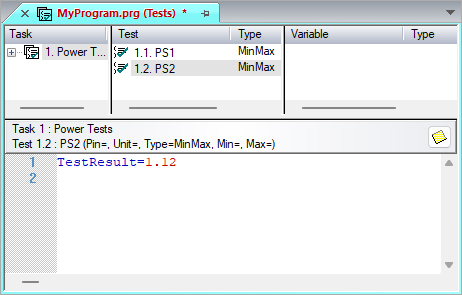
2. As shown below, click in the Test Code view.
3. Type: TestResult=1.12
as shown here:
4. Repeat steps 1-3 for the PS2 test. The value for PS2 is TestResult=2.5
As you can probably see, we are setting up the tests for one to FAIL and one to PASS when you run them. To learn how to run the application, see Running Your First Application.