ATEasy source files (Project, program, system and driver and can be saved as Binary or Text format. This section describes the text file format for these files. The file format can be determined by the file extension. The following file extensions are available:
● .PRJ - ATEasy binary project file
● .PJT. ATEasy Project text file
● .PRG - ATEasy binary program file module
● .PGT - ATEasy Program text file module
● .SYS - ATEasy binary system file module
● .SYT - ATEasy System text file module
● .DRV - ATEasy binary text file module
● .DRT - ATEasy Driver text file module
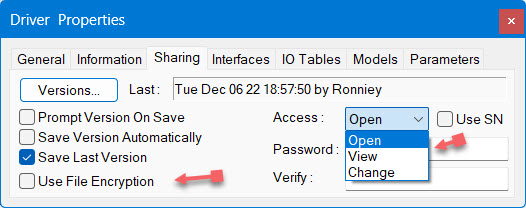
Common text file structure and convention are described in Text Files Sources Structure topic. While text file can be edited in any text editor including the one provided with ATEasy, binary file can be edited from the ATEasy IDE. ATEasy provide a way to convert the binary file to text format. It also provide a way to compare two binary files using ATEasy MKerge tool. The tool automatically convert the binary to text compare the result and when saved (if changes where made) it will convert it back to binary making it seamless. Binary file can be encrypted and also password protected from Open, View or Change rights. They load faster and can detect if a change was done externally maintaining their integrity. The following image highlights protection provided by ATEasy Binary module files: