ATEasy represents users, their privileges, and the operations affecting them using two internal classes: AUser and AUsers.
AUser is a class that represents the data making up the account of an individual user: his login name, full name, password, last login date, and whether he can use the full ATEasy Integrated Development Environment (IDE) menu or is restricted to a short menu. The User class can also stored application specific data using the Tag property.
AUsers is a class that provides methods for manipulating the AUser information, for displaying the three dialog boxes relating to users, and for using code in your procedures. AUsers also contains properties which relate to users, such as the total number of users in the users database, the name of the current user, and whether user login is required when ATEasy is started.
Many of these properties and methods are accessed using a special ATEasy internal variable called Users. For example, to find out the number of users in the users database, you can say:
print Users.UsersCount
To get the full name of the current user, you can say:
print Users.CurrentUser.FullName
Note: If logins have not been made mandatory, or if no user is logged in, Users.CurrentUser will return a null value. There is a legacy function from ATEasy 2, GetUserName(), which, if there is no user logged in, will return the name of the Windows user running the program.
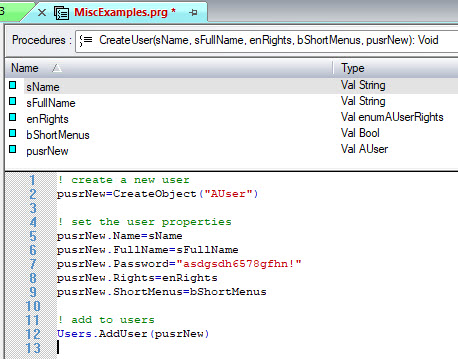
Other uses of "Users" are more complex. For example, to add a new user to the users database, you have to create and populate an instance of the AUser class, and then invoke Users.AddUser.
Note: If you are not logged in with Administrator privileges when you run code that uses statements, such as adding, deleting, or modifying a user, these statements will simply fail without raising an error.
ATEasy allows the programmer to display any of the following three dialog boxes associated with users without having to code those dialogs at a low level:
Users.ShowChangePassword
Users.ShowLoginDialog
Users.ShowUsersDialog
The ShowUsersDialog is another example of a statement restricted to those users with administrative privileges.