Navigating Using the View History |
Version 7 |
ATEasy maintains a list with history of the symbols that are viewed or selected in the symbol browser view. The history is displayed under the History of Views drop down list in the toolbar and under the View menu, selecting an entry in the list will show the symbol in a browser view. In addition, ATEasy's View Back and View Forward will show a view with the previous and next symbol as display in the list.
The history list saves a maximum of 20 unique symbol selections.
The following menu view commands are available:
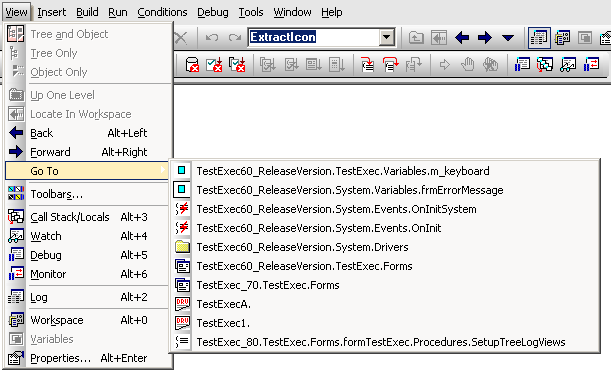
1. Go To command - this is a popup menu and its each menu item displays symbol selected in the history, once selected it will open a view displaying the symbol.
2. Back command - this allows you to go back and open a view to display the previous symbol in the list.
3. Forward command - this allows you to go to the next and open a view to display the next symbol in the history list.
These commands are also available in the Standard toolbar where the same history list is shown.
The following shows the commands above in menu as well as in the toolbar and an example of a GoTo history list :
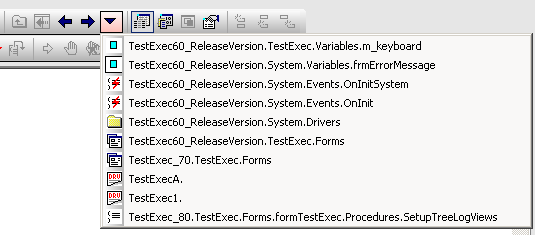
As you see above, the menu and Toolbar display the same history list. The second item is the current active symbol view marked by menu checked mark. Each item is display with an image indicating its type (procedure, variable, etc).
Each symbol selection is listed with its symbol path separated by "." each left path representing a container or parent. For example the selection of a form procedure SetupTreeLogViews() is displayed as :
TestExec_80.TestExec.Forms.formTextExec.Procedures.SetupTreeLogViews
Its parent is "Procedures" which belongs to a form "formTestExec" and it in turn belongs to submodule "Forms" which are under module "TestExec" a driver that is in the project called "TestExec_80".
The driver symbols above "TestExecA" and "TestExec1" are not belong to any system nor project - they are single objects.