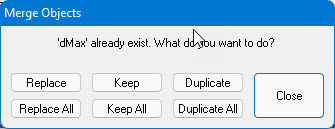
If you are pasting or dragging and dropping objects whose names already exist in the destination, ATEasy asks you what to do with these duplicate names using the following dialog box:
You can click the following buttons:
● Replace/Replace All replaces one or all objects in the destination with the new objects.
● Keep/Keep All prevents one or all objects in the destination from being replaced with the new objects. That is, none of the duplicate objects are copied into the destination.
● Duplicate/Duplicate All copies one or all of the new objects into the destination with new names.
Click the Close button to close the dialog box.
For example, you can use this operation to transfer variables from an old program to a new program. If you use the Keep All button, only variables with original names are merged into the new program.