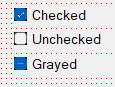
The ACheckbox control allows the user to select a checkbox and toggle its state from checked to unchecked, or from unchecked to checked. ACheckbox can be used to represent Yes/No or True/False options. Each checkbox can be checked or unchecked independently of any other checkbox. If you want to establish a choice among different options, you would be better off using ARadioButton.
At design time, you can set a number of properties for the ACheckbox control. Most importantly, you can set the initial state of the checkbox: whether its initial value is checked, unchecked, or, if you want the checkbox to be disabled because it is representing mixed state in a given context, grayed it out.
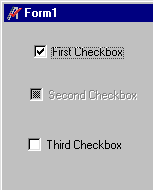
In this example, frmCheckboxes is a form variable representing a form called CheckboxForm. You can see that chkFirst and chkThird can be changed even after their values have been set. In the example, we lock chkSecond disabling it, so that its value cannot be changed. (A useful extension of this example might be to use the OnChange() event to change other checkboxes once a particular one has been selected).
load frmCheckboxes
print "Checkbox 1 value "; "\t";frmCheckboxes.chkFirst.value
! chkFirst, chkSecond, and chkThird have all been made Public
frmCheckboxes.chkFirst.value = achkChecked ! set Checkbox1 to checked (1)
frmCheckboxes.chkSecond.value = achkGrayed ! set Checkbox2 to grayed-out (2)
frmCheckboxes.chkThird .value = achkUnchecked ! set Checkbox3 to unchecked (0)
frmCheckboxes.chkSecond.Enabled = 0 ! prevent grayed-out Checkbox2 from being changed.