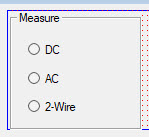
The AGroupBox Control provides a graphical, but NOT a functional grouping of controls. To group controls, first draw the frame and then draw the controls inside the frame. This visually organizes a group of controls, but does not enable you to move the frame and controls together. To group the controls together functionally, you need to set the called Container property in the property page for each control. When the container is made hidden (setting it Visible property to False) than all the controls on that container will be hidden. Controls inside a container are also drawn on top of the container and to be visible they must be placed within the container control area (otherwise they are clipped).
Controls placed inside a container control must select the Container control as shown here. In addition, if several radio boxes controls are placed on a container control and you wish only one of them to be selected at a time., use the GroupName property to group them.
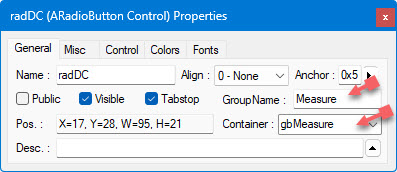
During run time, you can also change the Container by using the GroupName property:
radHigh.GroupName=gbOtherBox