 in
the Controls Toolbar, and then drag to create it on your form. It will
be invisible on your form at runtime, and you can keep it at a fairly
small size at design time just to keep your design uncluttered.
in
the Controls Toolbar, and then drag to create it on your form. It will
be invisible on your form at runtime, and you can keep it at a fairly
small size at design time just to keep your design uncluttered.ATEasy's ATimer control sends out an event notification at discrete intervals of time, measured in milliseconds. Often, in test applications, it is necessary to take measurements or trigger other events at these discrete intervals. For example, it may be necessary to generate data at specific intervals for use in a graph or chart, or to probe a Unit Under Test (UUT) every 500 milliseconds to see if the returned voltage is within nominal parameters.
To use the
ATimer control, simply click
on it in
the Controls Toolbar, and then drag to create it on your form. It will
be invisible on your form at runtime, and you can keep it at a fairly
small size at design time just to keep your design uncluttered.
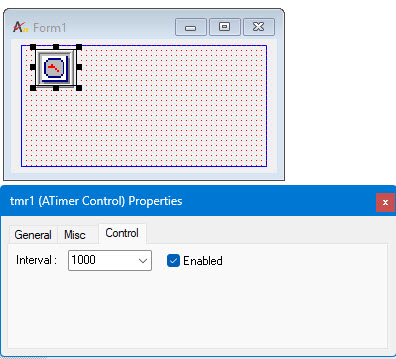
The ATimer control is quite simple. There are only two main properties which you can set: the Duration of the interva, Interval property, in milliseconds, and whether or not the timer is Enabled. In addition to these properties, the ATimer has a Name, a Tag, and a Description.
For each timer, there is only one event: OnTimer(). Each time the timer reaches a multiple of the duration, it sends out an OnTimer() event. Each time this event occurs, the code in the code box under the ATimer control and OnTimer() event is executed.
You can put multiple ATimer controls on your form to control divergent series of events.