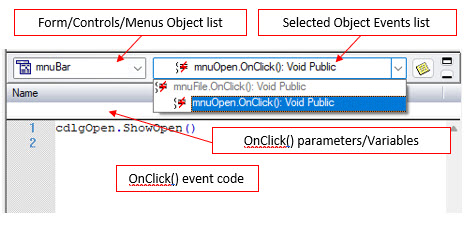
Every selectable menu item has an OnClick() event of its own. This event is fired whenever you click on the menu item. You can write an event handler to provide the implementation of this event. ATEasy allows you to add procedures to eachg menu item in the same way as you add them to other events.
The following shows the menu bar object displayed in the object list on the left, while the mnuBar menu items are displayed in a tree like on the right drop list (mnuFileOpen is selected here):
Menu items are displayed indented below the menu object (mnuBar). In the case of multiple levels of menus, there are multiple levels of indentation.
It's important to set the Name property of each menu item to a significant word, such as the word in its Caption (mnuOpen for Open...), otherwise, you will hard time matching the object name with the caption when writing the event code or referencing this object from other events.
Once you have selected the menu item OnClick() event you would like to type in a procedure for, you can type your code into the code pane.