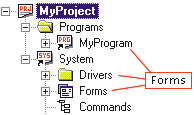
A Forms submodule is found in every module (Programs, System, and Drivers).
Creating a new form is typically a five step process. The steps are:
Create a new form
Set the form properties
Add controls
Program the form
Test the form
Single-click to select the Forms submodule.
|
|
A Forms submodule is found in every module (Programs, System, and Drivers). |
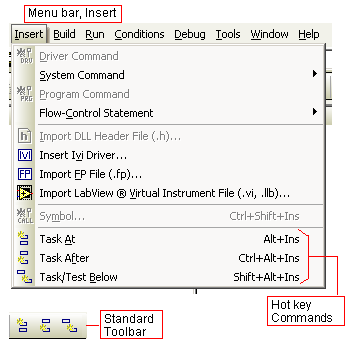
Use the insert commands to create a new form. There are three ways to insert a new form.
Alt+Ins Ctrl+Alt+Ins Shift+Alt+Ins |
|
If you are creating the first form in a Forms submodule, you will only be able to use the Insert Object Below command (the other insert commands are disabled).
If you are creating the second (or later) form in a Forms submodule, you will only be able to use the Insert Object At or After commands, Insert Object Below is disabled.
Use the Properties window to declare or change the properties of the form. Single click on the for to make it the selected object.
 To open the Properties Window, Click on the Properties Window icon in the Standard Toolbar, select "Properties." from the View menu, or press Alt+Enter (hot-key command).
The Properties window provides approximately 50 form attributes you can modify—giving the designer great flexibility in providing for the needs of an automated test system.
Controls are the active elements you add to a form to display information and issue commands. The graphical nature of the controls further increases the flexibility in providing for the needs of an automated test system. Two Toolbars are available to aid the forms designer.
A Forms Design toolbar for organizing objects on the forms.
A Forms Controls toolbar to help in creating the form elements.
The program (procedures) that support a form add the communications between the form and the outside world. Procedures are used to change user actions (buttons, menus, etc.) into instrument commands, interface with test programs, and translate external stimulus into form actions. ATEasy provides a rich library of functions and events to enhance the programming effort.
A form can be displayed with a simple click of the FormIt! button  . This allows you to quickly judge the current design and layout of the form. Testing form interactions through procedures is aided by the tools from the Run and Debug menus.
It is unlikely that designing, building, programming, and testing will ever be a simple five-step process. It is more likely that the process will be iterative. Design, build, program, test. Then re-program, then re-test, and so on until the process is completed.