
Any variable you use in a form procedure must be declared; you must add the variable to the form. This is done visually, using the variables pane of the form window.
You can right-click in the pane and use the context menu to insert  a variable, or you can use the Insert Below
  or Insert At
  button from the toolbar to do the same thing.
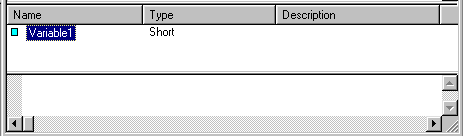
When you first insert a variable, it is named generically -- something like Variable1 -- and its type is set to Short. You may wish to change the name to something significant, change the type to the proper datatype for your purpose, and add a comment that explains the function of the variable. In order to do this, you need to get the Properties page for the variable. You can right-click on the variable name and select Properties  , or double-click on the blue square
  next to the variable name; in either case, you will bring up the Properties page.
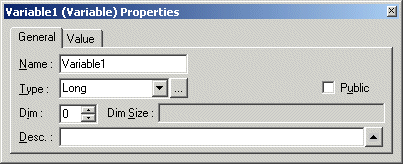
To change the name of the variable, replace the name in the Name field. To change the Type, select a value from the Type box, or, if you are creating a form variable, type in the name of the form. (For explanations of most of the data types in the Type pulldown menu, look at Basic Data Types and Other Data Types in the Programming Language.)
The Dim field indicates the number of dimensions the variable will have. If the value there is greater than zero, the variable is an array of the data type indicated in the Type field. The Desc field allows you to enter in a description of the variable.