ATEasy applications are designed to provide easy-to-use Help to users.
ATEasy supports the creation of four types of Help.
-
What's This
-
Context-sensitive
-
On-line documentation
-
ToolTip
|
ATEasy applications are designed to provide easy-to-use Help to users. ATEasy supports the creation of four types of Help.
|
|
|
Type of help |
Description |
|
ToolTip |
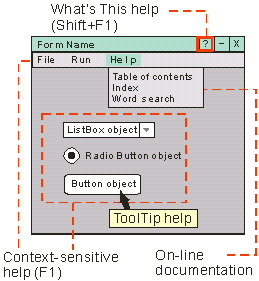
Help that is displayed when you move the mouse cursor over form controls. ToolTip Help is displayed in a small window below the mouse cursor. |
|
What's This |
A brief Help description of a form control or menu item. The Help message is displayed when you click on the What's This Help icon or press Shift+F1, then click on a form control.
What's This Help is displayed in a small window near the selected form control. |
|
Context-sensitive |
A link to a Help topic that provides Help on the program function or action at the time you press F1. Context-sensitive Help pertains to the object that currently has focus (the selected object). If you are selecting a menu item, the Help should provide information on the current menu item. If a form object (drop-down list box, check box, radio button, etc.) currently has focus, the Help should provide information on the selected form control. Context-sensitive Help is displayed in a separate Help window. |
|
On-line document |
An electronic book, similar to this Help file which includes tutorial, reference, and general information about an application. This form of Help essentially means "I want to go look up information." Many Help systems let you look up topics by browsing through a table of contents, looking up topics in an index (index search), and looking up words (word search). On-line document Help is displayed in a separate Help window. |
Each type of Help connects to Help information in a slightly different way.
What's This Help can either be held within the Form Properties window or linked through the Form Properties window to an external file.
Context-sensitive Help always links to an external file. Generally this link goes to a specific topic within the Help file. The topic is selected with a topic ID.
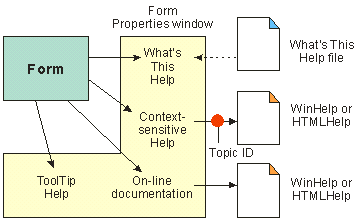
On-line documentation always links to an external file. Generally this link goes to a table of contents, index, or word search view of the Help file.
ToolTip Help is contained within the Form Properties window; no external files are needed.
ATEasy supports both HTMLHelp and WinHelp Help authoring tools. Consult your Help authoring documentation for specific details on creating Help.
|
|
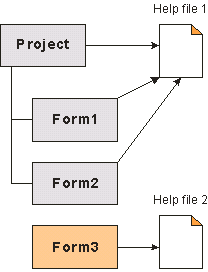
You can link a Help file from both the Project and Form modules. If a Help file is not specified from within the Forms Properties window, the project Help file is used. If a Help file is specified from within the Forms Properties window, it will be used to display Help rather than the project Help file. Forms 1 and 2 use the project Help file. Form 3 uses its own Help file. |
Form Help may be executed on a conditional basis. Two form events are available that let your application decide if Help should proceed in a normal fashion, provide special Help, or not provide any Help at all. These events are OnHelpContext( ) and OnWhatsThisHelp( ). The following code shows how these functions can be used.
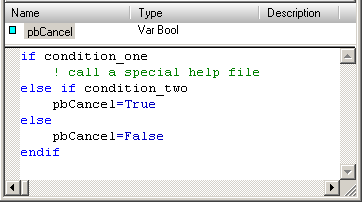
If the variable pbCancel is set to false, the Help is displayed. If pbCancel is set to true, Help is skipped.
 What's This Help is only available on those forms displaying the What's This Help icon.