You can use early binding or late binding to create instances of .Net Assembly objects so that you can use them in ATEasy applications. Using late binding, you create Assembly objects that are defined by a variable declaration of type Object. Using early binding, you create Assembly objects that are defined by a variable of a type that is specific to the object.
To create Assembly objects, ATEasy provides a new operator called "new" for Assembly object creation. Two main things about Assembly class object must be observed, unlike COM object:
1. Assembly object can be created with parameters (overloaded constructors).
2. Assembly class does not have location information (no registration).
Thus, Assembly objects must be created via 'new' operator:
cls1=new
DotNetClass1() ! constructor with
no argument
cls1=new DotNetClass1(True) ! constructor
with argument of type BOOL
cls1=new DotNetClass1('A') !
constructor with argument of type CHAR
In ATEasy v 5.0, the new operator can be also used to create a COM object
To create an instance of an Assembly object using late binding, first declare a variable (for example, a variable named "ob") and define its type as Object. You can also use the basclass for all .Net classes
ob = new DotNetClass1()
Declaring a variable as an Object type creates a variable that can contain a reference to any type of object. However, access to the object through that variable is late-bound; that is, the binding occurs when your program is running. During compilation, ATEasy parser won't be able to check its validity.
All Assembly classes support the IDispatch interface which allows ATEasy to invoke the appropriate functions during run time.
To create an object variable that results in early binding, that is, binding when the program is compiled, declare the object variable with a specific class type. In order to use a specific class type, you must have added to your application a .Net Assembly containing that class. For example, you can declare and create as follows:
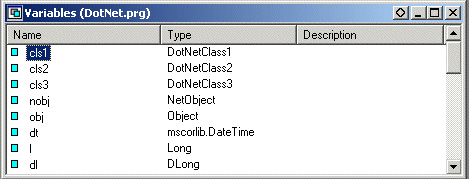
First declare the variable named cls1, cls2, and cls3 for .Net class objects.
cls1 = new
DotNatClass1()
cls2 = new DotNatClass2()
cls3 = new DotNatClass3()
Using an object inside a .Net assembly through the early-bound variable can give better performance, but can refer only to the class specified in the declaration.
You can pass a class object created by the new operator to a function expecting an object as an argument. For example, the following code creates and passes a reference to a .Net class object:
MySub( new DotNetClassX() )
You can use Library name followed by namespace to clarify any ambiguous class or type name. For examples,
dt=new MSCORLIB.DateTime()
dt=new MSCORLIB.System.DateTime()
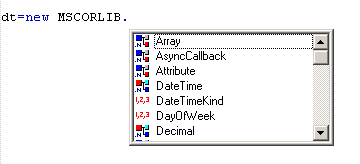
Code Completion of ATEasy will display a list of namespaces after library name followed by ".", see first screen capture. When you choose a namespace, ATEasy will display every class and type that are grouped under the namespace. Then you can select one you want.
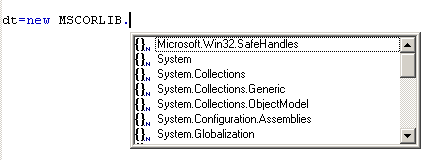
Choose namespace "System", the following will display: