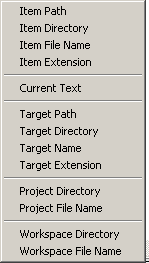
You can again use the Arrow button to select from a list of predefined arguments (v7.0) :
This Arguments dialog box will be displayed upon the selection of a user defined tool from the Tools menu that gas Prompt for Arguments checked. The dialog caption is the tool name (in this example Edit In Text Format). The dialog is used by the user to enter argument to the tool being executed. The dialog contains the following fields:
It is initially filled with what has been set for arguments in the Customize dialog - Tools page.
You can temporarily set new arguments that are to be passed to the tool
that you just selected.
You can again use the Arrow button to select from a list of predefined
arguments (v7.0) :
You can add more than one. For a complete list of predefined arguments
and their definitions, see Arguments
for External Tools.
Arguments set in this dialog will not be remembered.
This shows the command line (read only) of the tool currently selected.
Accepts any changes and closes the dialog.
Cancels any changes and closes the dialog.