Use this dialog box to add an interface to a GPIB driver.
Specify the ATEasy GPIB board address (1-9) used to access/address this board. If you have one GPIB interface set this number to 1 (default).
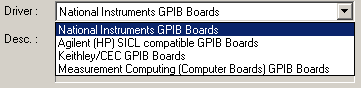
Select the ATEasy
interface driver from the drop-down list:
ATEasy obtains this list of drivers from the Windows registry during setup.
This field display's the interface's driver description.
Click here to save your changes and close the dialog.
Click here to discard your changes and close the dialog.
Click here to go to a dialog box from which you can specify settings for the interface driver, such as the board index/logical unit and primary address.. These settings vary depending on board manufacturer. Please refer to Gpib Interface Settings Dialogs for each setting.