Scope rules define how ATEasy searches to resolve an identifier when the identifier is specified with no qualifier.
Scope rules are used in:
Test code parameters.
Variables and procedures type.
Module event/procedure code.
Form event/procedure code.
Scope rules are not used, for example, if you use a qualifier with your variable because ATEasy can call the precise variable being searched. For example, using Form1.MyVariable, where Form1 is the qualifier (name of the form) within which MyVariable is contained, allows ATEasy to know precisely which variable is being called.
Scope rules, however, are used when ATEasy searches for unqualified variable names.
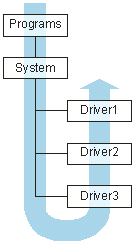
All scope issues look upwards for their resolution. If a variable is not found within a local procedure or event, ATEasy then looks in the container of that procedure or event. For example, if you have a procedure within an event, and a variable referred to in the event handler is not found at the level of the event, ATEasy then looks upward to the container of that event, whether that container is a control or the Form. The next step up from the Form would be the enclosing module, the Program or the System. Once you get up to the module level, ATEasy can look in libraries; the internal library is common to all modules.
If the variable name still has not been resolved, ATEasy starts looking in the Drivers. Refer to the diagram below. Here, the scope rules differ from the rest of the program. ATEasy searches the Drivers for public items that will resolve the variable name, but it does so in the reverse order from the order in which the Drivers were loaded.
ATEasy behaves this way because you can have high-level Drivers that refer to low-level Drivers. The low-level drivers need to be loaded first. Within the Drivers, ATEasy will return the first matching name it finds; it will not go on to find other matches, even if they exist.