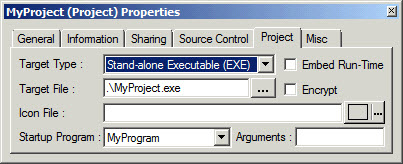
Project Properties - Project Page |
For details, click the image |
modified v7, v10 |
To view or change these properties in the Project properties window,
right-click the Project's icon
( )
in the Workspace window and select Properties
)
in the Workspace window and select Properties
 from the context menu.
The Project page on the Project Properties window is described below. Click the other tabs for a description of the General page, Information page, and Sharing page. The same General page and Information page are displayed for ATEasy programs, drivers, and systems, as well as for projects.