This section describes the requirements for calibrating Marvin Test Solutions’ GX1120 Arbitrary Waveform Function Generator PXI card.
Supported Devices: GX1120.
Program: GX1120.
Recommended Calibration Interval: 1 Year.
Required Hardware:
1. GX1120.
2. 50 Ohm BNC Male Load Up To 1 GHz Terminator, +/-0.25 Ohms accuracy and minimum of 2W.
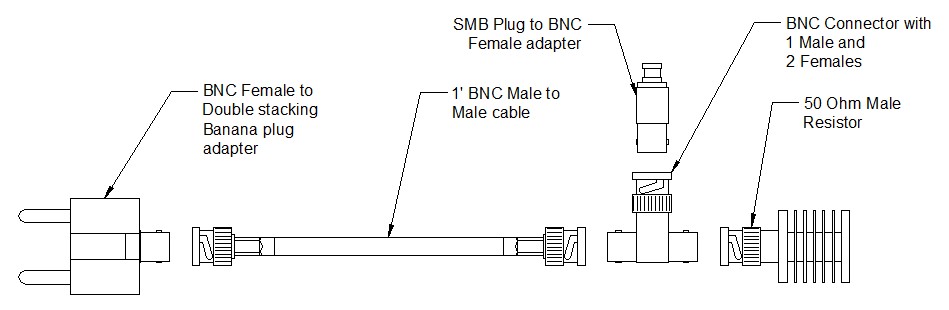
3. SMB Plug to BNC Female Adapter.
4. BNC T connector with 1 male and two female connections to connect with up to three co-axial cables.
5. BNC Female to Double Stacking Banana Plug Adapter.
6. 1’ BNC male-to-male cable.
Required Software:
1. ATEasy run-time (see the ReadMe.txt for supported versions).
2. GtWave v1.3.2 or newer.
3. CalEasy v1.4.6 and above.
4. Standards driver manufacturer's as specified below.
Required Standards and Capabilities:
1. COUNTER – Universal Counter with at
least 10 digits of measurement accuracy.
Provided instruments drivers: Marvin Test Solutions GX2200, Keysight
Technologies 53131A, 53132A, 53210A, 53220A, 53230A.
2. DMM –
6 ½ DMM with VDC and IDC measurement functions.
Provided instrument drivers: Agilent 3458x, Keithley 200x (2001,
2002), Marvin Test Solutions GX2065, Signametrics SMX204x (SM2040, SM2042,
SM2044), Signametrics SMX206x.
3. POWER
METER – power meter with
high measurement accuracy supporting 1 KHz to 100 MHz frequency range.
Provided instruments drivers: Keysight U8481A-200, DC – 18 GHz USB
Thermocouple Power Sensor, -35bBm to +20dBm (316nW – 100mW). Requires
IVI-C (32/64 bit) driver from Keysight and VISA resource
manager (NI Measurement & Automation Explorer or NI-MAX, or Keysight
IO Libraries suite).
Note: See Instrument Standards DLL Files section for more information about the Standard Driver software requirements and setup.
The following diagram shows the calibration harness connections in order to calibrate the GX1120 board.
Calibration Harness Connections in Order to Calibrate to the GX1120 Board
1. Connect the GX1120 channel 1 to the SMB Plug to BNC Female Adapter.
2. Connect the SMB Plug to BNC Female Adapter to the BNC T connector.
3. Connect the BNC T connector to the 50 Ohm terminator.
4. Connect the BNC T connector to the BNC cable.
5. Connect the BNC cable to the BNC Female to Double Stacking Banana Plug Adapter.
1. Start CalEasy.exe executable.
2. Select standards instruments for Counter, DMM, and Power Meter.
3. Click Start.
4. Select the verification and calibration program mode: Verify, Verify and if Passed, Update Calibration Date, Verify and Calibrate If Required or Calibrate.
5. Run Calibration Program.
6. Follow the prompted harness connection messages.
Verification – About 35 minutes
Calibration – About 35 minutes.