This section describes the requirements for calibrating the Marvin Test Solutions GX2065 Digital Multi-Meter with CalEasy.
Supported Devices: GX2065.
Program: GX2065.
Recommended Calibration Interval: 1 Year.
Required Hardware:
1. GX2065 DMM.
2. 2 Shielded Double Banana plug cables (RG58C, e.g., Pomona Electronics 2BC-24/48).
3. 2 High current 30A test leads.
4. Fluke 5522A/5500A, Fluke 57xxA, or Equivalent Calibrator.
Required Software:
1. ATEasy run-time (see the ReadMe.txt for supported versions).
2. GxDmm v2.3 or newer.
3. CalEasy v1.4.6 or newer.
4. Standards driver manufacturer's software as specified below.
Required Standards and Capabilities:
1. REF – Calibrator with specifications
that are equivalent to the Fluke 5522A specifications.
Provided instrument driver: Fluke 5522A/5500A, Fluke 57xxA.
Note: See Instrument Standards DLL Files section for more information about the Standards Driver software requirements and setup.
In order to calibrate the GX2065 the following cables are required:
Part number |
Description |
RG58C/U 24 |
24 inch double Banana Jack plug cable. |
5520A-525A/LEADS |
Calibration Lead Kit (includes 2x High current, 30A, test lead), available from Fluke Corporation. |
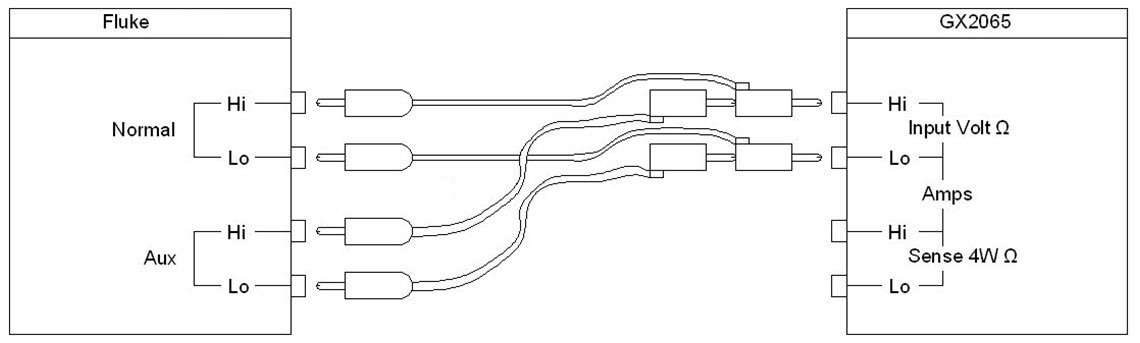
VDC and VAC and 2Wire Connection:
1. Compensated: Connect Banana Plug from Calibrator Normal Hi and Lo to Gx2065 Input Hi and Lo.
2. Connect another Banana Plug from Calibrator Auxiliary Hi and Lo to Gx2065 Input Hi and Lo.
3.
GX2065 - VDC and VAC and 2Wire Connection
1. Compensated: Connect Banana Plug from Calibrator Normal Hi and Lo to Gx2065 Input Hi and Lo.
2. Connect another Banana Plug from Calibrator Auxiliary Hi and Lo to Gx2065 Sense Hi and Lo.
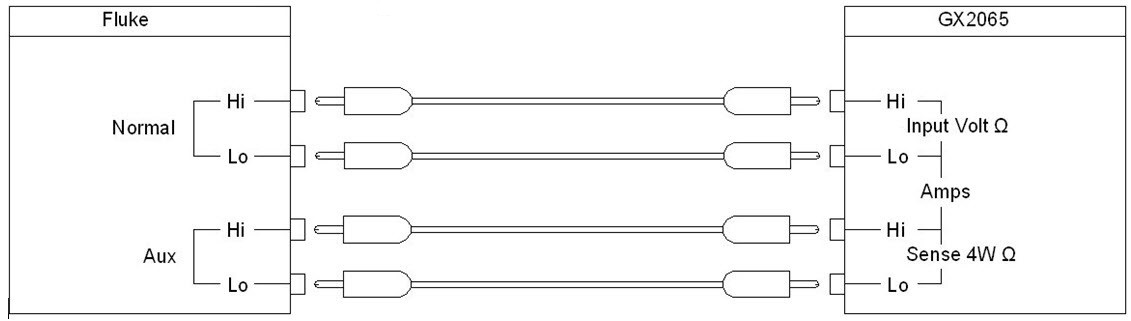
GX2065 - 4Wire Connection
3. Not Compensated: Connect Banana Plug from Calibrator Normal Hi and Lo to Gx2065 Sense Hi and Lo.
4. Connect another Banana Plug from Calibrator Normal Hi and Lo to Gx2065 Input Hi and Lo.
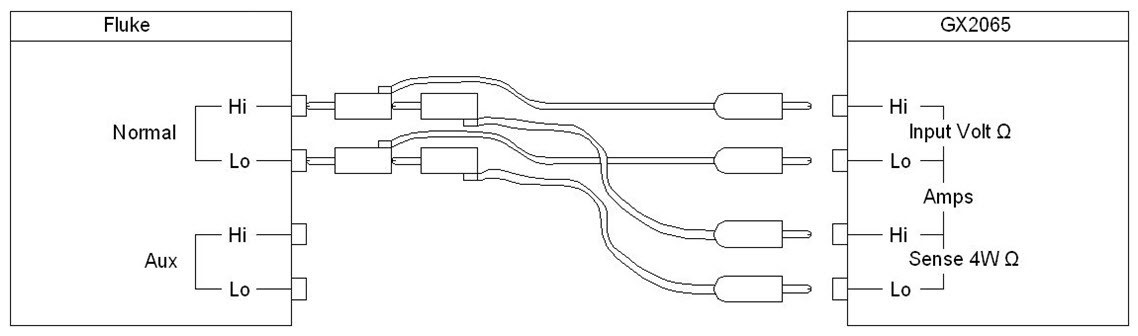
GX2065 – 2 wire Connection
1. Connect low resistance high current cable from Calibrator Auxiliary Hi to Gx2065 Sense Hi. Connect another low resistance high current cable from Calibrator Auxiliary Lo to Gx2065 Lo Voltage Input.
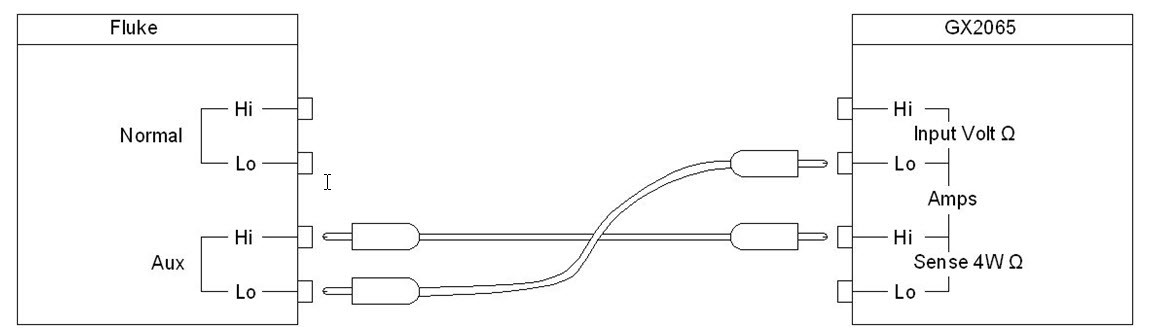
GX2065 - IDC and IAC Connection
1. Start CalEasy.exe executable.
2. Select standards instruments for REF.
3. Click Start.
4. Select the verification and calibration program mode: Verify, Verify and if Passed, Update Calibration Date, Verify and Calibrate If Required or Calibrate.
5. Run Calibration Program.
6. When prompted, connect and disconnect the Voltage and Current cables as instructed by pop up boxes.
Verification – About 38 minutes.
Calibration – About 115 minutes.