This section describes the requirements for calibrating Marvin Test Solutions’ GX3788 FPGA Multi-Function PXI 3U card.
Supported Devices: GX3788.
Program: GX3788.
Recommended Calibration Interval: 1 Year.
Required Hardware:
1. GX3788.
2. GX6377 Switch Matrix.
3. 6 ½ digit DMM (minimum requirement).
4. Calibration cable kit, GX3788-CALKIT, consisting of the GX95962, GT95015 and a GT95032-12 SCSI cable assembly.
Required Software:
1. ATEasy run-time (see the ReadMe.txt for supported versions).
2. GxFpga v2.3.4 or newer.
3. CalEasy v1.4.4 or newer.
4. Standards driver manufacturer's software as specified below.
Required Standards and Capabilities:
1. DMM – 6½ digit DMM (minimum
requirement) with VDC and IDC measurement functions.
Provided instrument drivers: Agilent 3458, Keithley 200x (2001,
2002), Marvin Test Solutions GX2065, Signametrics SMX204x (SM2040, SM2042,
SM2044) or SM206x.
2. MATRIX –
Switch matrix with at least 32x2 rows/columns. Channel I/O must support
the pin-out of the GX95962 Calibration Harness.
Provided instruments drivers: Marvin Test Solutions GX6377.
Note: See Instrument Standards DLL Files section for more information about the Standard Driver software requirements and setup.
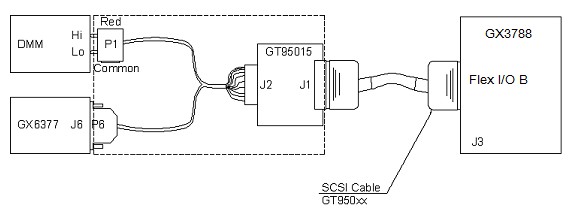
The following diagram shows the calibration harness connections in order to calibrate the Gx3788 board.
Calibration Harness Connections in Order to Calibrate the Gx3788 Board
1. Start CalEasy.exe executable.
2. Select standards instruments for Matrix and DMM.
3. Click Start.
4. Select the required mode the verification and calibration program should run: Verify, Verify and if Passed, Update Calibration Date, Verify and Calibrate If Required or Calibrate.
5. Run Calibration Program.
6. Follow the prompted harness connection messages.
Verification – About 9 minutes.
Calibration – About 15 minutes.