This section describes the requirements for calibrating Marvin Test Solutions’ GX5296 Dynamically Controlled, Digital I/O PXI Card with PMU per pin using CalEasy.
Supported Devices: GX5296.
Program: GX5296.
Recommended Calibration Interval: 1 Year.
1. GX5296.
2. GX6377 Switch Matrix.
3. GT950xx SCSI cable assembly.
4. GX95962– Calibration Harness.
5. GT95015-CAL Interface Board.
Note: Items 3,5 and 5 are included in the GX5295/5296-CALKIT which includes the GT95032-12, 12-inch SCSI cable assembly.
Required Hardware using TS-900e-5G Calibration Adapter:
1. GX5296.
2. Marvin Test Solutions TS-900e-5G Calibration Adapter.
3. 7 ½ digit DMM (minimum requirement).
4. 5 24-inch Patch Cord with Banana Plugs on both ends.
1. ATEasy run-time (see the ReadMe.txt for supported versions).
2. GxPio v4.1.2.0 or newer for Gx5733 (if using TS-900e-5G Calibration Adapter).
3. GtDio6x v2.0.15.2 or newer for Gx5296.
4. CalEasy v1.5.4.1 or newer.
5. Standards driver manufacturer's software as specified below.
1. DMM – 7 ½ digit DMM with VDC and IDC measurement functions that has the following current accuracy measure capabilities (e.g., Keithley 2002):
Force Current Range |
Maximum measurement reading error |
± 32 mA |
± 64 uA |
± 8 mA |
+/- 16 uA |
+/- 2 mA |
+/- 4 uA |
± 512 uA |
+/- 1.024 uA |
± 128 uA |
+/- 256 nA |
± 32 uA |
+/- 64 nA |
± 8 uA |
+/- 16 nA |
± 2 uA |
+/- 4 nA |
Provided instrument drivers: Agilent
3458, Keithley 200x (2001/2002).
2. SWITCH MATRIX:
Switch matrix with at
least 32x2 rows/columns, the channel I/O must support the pin-out
of the GX95962 Calibration
Harness.
Provided instruments drivers: Marvin Test Solutions GX6377.
When using TS-9XXe-5G systems with in-system calibration, use the CalMatrixTS9xx Switch matrix. Provided instruments drivers: Marvin Test Solutions CalMatrixTS9xx.
Note: See Instrument Standards DLL Files section for more information about the Standard Driver software requirements and setup.
In order to calibrate the Gx5296 the following cables are required:
Part number |
Description |
GX95962 |
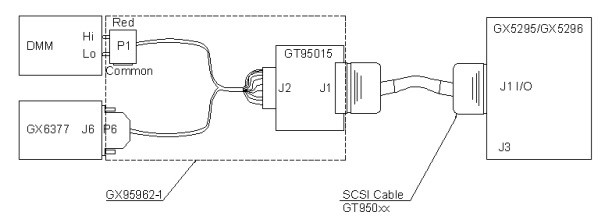
GX5296 Calibration Harness. The harness connects the GX5296 I/O connector (J1) to the switch matrix and the DMM using the 68-Pin SCSI shielded cable that is supplied with the CALKIT. The 68-Pin SCSI shielded cable can be any of the following:GT95021 2' shielded cable.GT95022 3' shielded cable.GT95032 6" shielded cable.GT95032-12 shielded cable (supplied with CALKIT). |
The following diagram shows the calibration harness connections to calibrate the Gx5296 board.
Calibration Harness Connections in Order to Calibrate the Gx5296 Board
1. Connect one side of the 68-Pin SCSI shielded cable to the GX5296 J1 I/0 connector and the other side to the GT95015-CAL (Connector Interface board).
2. Connect GX95962 P6 to the Switch Matrix.
3. Connect GX95962 P1 to the DMM (for voltage measurement).
4. Connect GX95962 P2 to J2, GT95015-CAL board.
5. Start CalEasy.exe executable.
6. Select standards instruments for DMM and Matrix.
7. Click Start.
8. Select the verification and calibration program mode: Verify, Verify and if Passed, Update Calibration Date, Verify and Calibrate If Required or Calibrate.
9. Run Program.
10. When prompted connect Calibration Harness SCSI cable from J1 I/O connector on DIO to J3 connector on DIO (when using a switch matrix).
The figure below displays the TS-900e-5G Calibration Adapter for the TS-9XXe-5G. The TS-9XXe-5G’s system TS-900e-5G Calibration Adapter is a PCB assembly which mounts on the system pogo pin receiver interface. The adapter provides access to all pogo pin blocks via .1 x.1 double row headers, facilitating the creation of connections between all Marvin Test Solutions installed PXI hardware and the extremal measurement and reference standards to be used in the calibration or verification process:
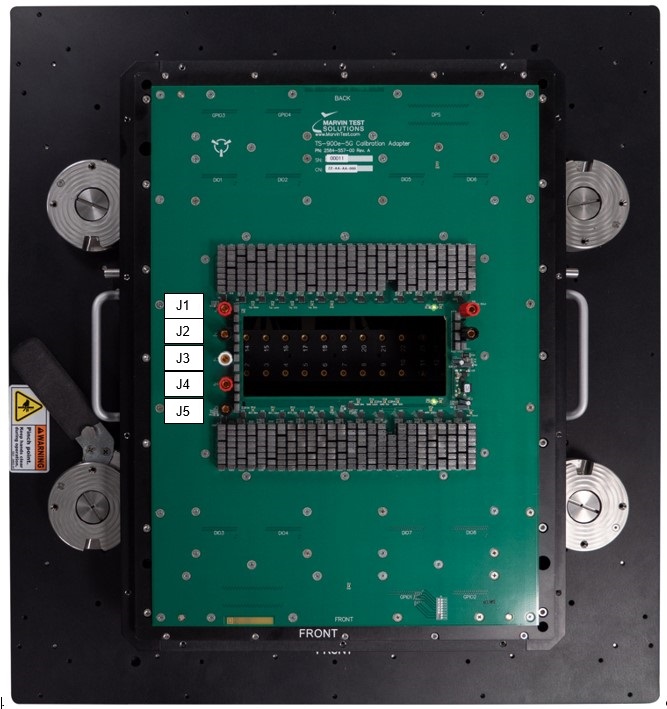
GX5296-Details TS-900e-5G Calibration Adapter connections
Connector label |
Description |
J1 |
External DMM Voltage input High. |
J2 |
External DMM Voltage input Low. |
J3 |
External DMM Voltage input Current. |
J4 |
Sense High – internally shorted to J1 (no connections required). |
J5 |
Sense Low – internally shorted to J2 (no connections required). |
1. Connect red banana plug between J1 Calibration Adapter to DMM input Hi.
2. Connect black banana plug between J2 Calibration Adapter to DMM input Lo.
3. Connect red banana plug between J3 Calibration Adapter to DMM input Amps.
4. Start CalEasy.exe executable.
5. Select standards instruments for DMM, and Matrix.
6. Click Start.
7. Select the verification and calibration program mode: Verify, Verify and if Passed, Update Calibration Date, Verify and Calibrate If Required or Calibrate.
8. Run Program.
Verification – About 36 minutes (using Keithley 2002).
Calibration – About 175 minutes (using Keithley 2002).