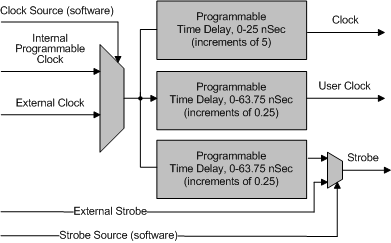
The clock (CLK) signal initiates each output vector. The rate of this signal can be programmed from 5Hz to 50MHz (depend on board configuration). Similarly, the strobe signal latches the input vector. All clock and strobe signals are distributed evenly to all DIOs (in the same Maser/Slave domain) through J7 using the timing cable.
Timing board has the following clock source signals:
1. Internal Programmable Clock – programmable clock from 5Hz to 50MHz with increments of 1HZ. See Specifications for details
2. External Clock – supplied by the user through J1 Timing Control, can be from 5Hz to 50MHz. See Specifications for details.
There are three clock signals coming out of the Timing board:
1. Clock The DIO sends output patterns to the IO Module connector on the rising edge of the Clock (CLK) signal. The Clock can have a delay of 0-25 nSec (with increments of 5) relative to the current clock source.
2. User Clock This clock signal has the same source and frequency as the Clock but can have a different time delay. The User Clock can have a delay of 0-64 nSec (with increments of 0.25) relative to the current clock source.
3. Strobe The DIO captures input patterns from the IO Module connector on the rising edge of Strobe (STB). When the Strobe source signal is internal, it has the same frequency as the Clock signal. The Strobe can have a delay of 0-64 nSec (with increments of 0.25) relative to the current clock source.
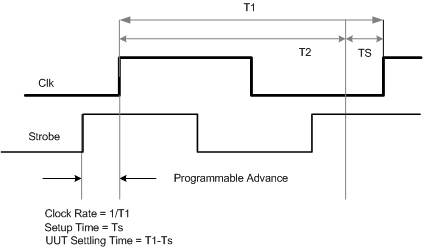
The timing diagram in the figure below displays CLK and Strobe signals. The DIO board can be driven using either internal or external clock sources. In internal mode, Strobe occurs Ts nanoseconds before the next clock (CLK) signal (16 nSec default). Ts can be set from 0 – 25 nanoseconds before the CLK signal. In the external mode, Clock or Strobe signals are provided externally.
A timing diagram of the CLK and Strobe signals is shown:
Signal Timing Diagram