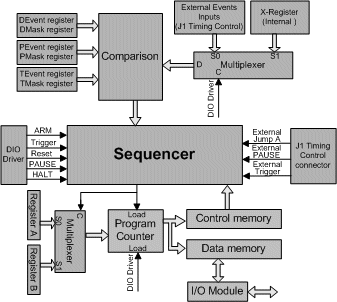
This section describes how the test program is controlled. The Sequencer (see the figure below) controls the Program Counter. It determines the next step to be executed. Sequencer inputs include the following:
● Control Memory
● 16-bit DEvent and DMask registers
● 16-bit PEvent and PMask registers
● 16-bit TEvent and TMask registers
● 16-bit External Event inputs or internal X-Register (software controlled).
● External Jump A, External Trigger, External PAUSE.
● Register A or Register B (holds the address for a Jump A/Jump B command).
● Software commands: Trigger, PAUSE, ARM, HALT, RESET
Program Control Block Diagram
Each command byte residing in Control Memory controls two, four or eight steps depend on the memory width setting (see the section above on Memory Width and Depth Settings). Sequencer commands allow test ware to control and manipulate the Program Counter.
The Program counter can be loaded with memory addresses stored in Register A, Registers B whenever a Jump A/B command is executed. The counter value can also be set using the DIO driver command.
The Trigger command causes the board to change to the Run state. Trigger can originate from the following sources:
● Software (DIO driver function).
● External trigger control line.
● Comparing the 16 External Event lines or the X-Register to the TEvent TMask registers. The trigger mode needs to be set to T trigger, DT trigger or TD trigger using the DIO driver. Selecting either the 16 External event lines or the X-Register is done through the software (DIO driver function). See the External Event Lines below for details on the comparison mechanism.
The software trigger originates within the PC. The trigger command takes effect immediately, and overrides other established trigger conditions. This happens when the DioTrig command is called from the Driver.
External trigger originate from the External Trigger line. Pulling this line low causes the board to enter the Run state. The External Trigger line overrides other set trigger conditions.
It is possible to set a conditional trigger command activated upon receiving certain event inputs. This event may be any expected value on all or part of the external event input lines or the X-Register. The event lines are ANDed with pre-defined masks and compared with predefined events in registers D and T.
The External Event Lines and X-Register trigger function is displayed in the figure below.
_Events_Block_Diagram.gif "Trigger (D and T registers) Events Block Diagram")
Trigger (D and T registers) Events Block Diagram
The external event trigger can be set to one or two levels. In the one level mode the trigger generates after the external condition have been met subject to the D or T event mask register. In the two level mode, the board waits for two sequential event conditions before issuing the trigger signal (D first, T second or vice versa).
The Pause command causes the board to enter the Pause state. It originates from the following sources:
● Software (DIO driver function)
● External control line (XPAUSE on J1)
● Comparing the 16 External Event lines or the X-Register to the PEvent PMask registers. The trigger mode needs to be set to T trigger, DT trigger or TD trigger using the DIO driver. Selecting either the 16 External event lines or the X-Register is done through the software (DIO driver function). See External PAUSE Event Lines below for details on the comparison mechanism
● Sequencer command
External Pause is activated when the external pause line goes low. This causes an immediate pause. The external pause condition overrides internally generated pause conditions.
The External/Internal Events pause function is displayed in the figure below. The P Mask and P Event registers can be used to create conditional pauses that depend on External Event lines or the internal X-Register. The event lines are ANDed with predefined masks and compared with pre-defined events in register P. The event source is selected by software to be either the External Event Lines or the X-Register.
_Event_Block_Diagram.gif "Pause (P Register) Event Block Diagram")
Pause (P Register) Event Block Diagram