The operation of a GX5280 board is best understood by studying the operation of a single I/O channel.
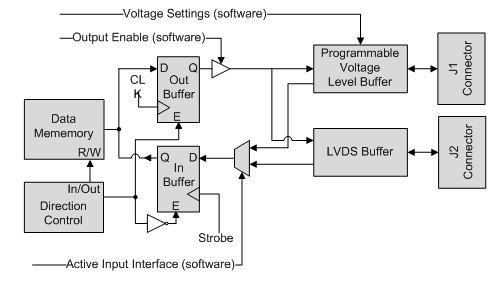
The figure below displays a simplified block diagram of a single I/O channel. This diagram shows how one channel functions.
I/O Channel Block Diagram
The Channel’s Direction control is set to output through software enabling the Out Buffer and disables the In Buffer. At the Out Buffer output there is an Output Enable Driver that is controlled by software. The output signal is then being fed into two buffers: Programmable Voltage Level Buffer and LVDS Buffer. Both buffers will output the signals to both J1 and J2 connectors. The out signal that goes through the Programmable Voltage Level Buffer its Output logic high voltage level can be programmed using software (see specification for details). Data is going to be latched to both J1 and J2 connectors on every rising Clock (when in RUN mode).
The Channel’s Direction control is set to input through software enabling the In Buffer and disables the Out Buffer. The In Buffer input signal source can be programmed to be J1 or J2 input. If selecting the Programmable Voltage Level Buffer, the threshold can be programmed using software (see Specifications for details). Data is going to be latched into memory on every rising Strobe (when the DIO is in RUN mode).
Programmable Voltage Level Buffer and LVDS Buffer. Both buffers are outputting in tandem to both J1 and J2 connectors. The out signal that goes through the Programmable Voltage Level Buffer its Output logic high voltage level can be programmed using software (see specification for details). Data is going to be latched to both J1 and J2 connectors on every rising clock (when the DIO is in RUN mode).