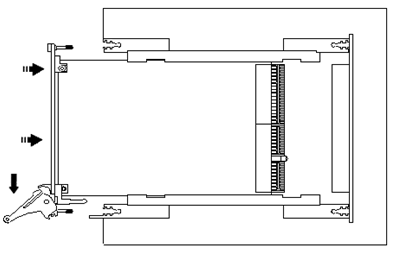
Install each of the boards as follows:
● Turn off the PXI chassis and unplug the power cord.
● Locate a PXI empty slot on the PXI chassis.
● Place the module edges into the PXI chassis rails (top and bottom).
● Carefully slide the PXI board to the rear of the chassis, make sure that the ejector handles are pushed out (as shown in the figure below).
Ejector handles position during module insertion
● After you feel resistance, push in the ejector handles as shown in the figure below to secure the module into the frame.
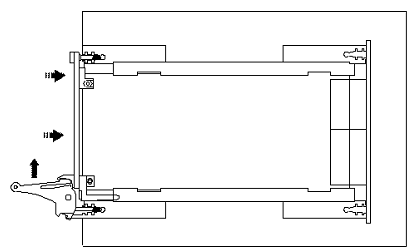
Ejector handles position after module insertion
● Tighten the module’s front panel to the chassis to secure the module in.
● Connect any necessary cables to the board.
● Plug the power cord in and turn on the PXI chassis.
|
Caution - Do not connect a device under test (DUT) to the GX5295’s I/O connections prior to powering up the card. Transient voltages can be present on the card’s I/O connectors at power up which can damage the DUT. Always disconnect the DUT prior to powering up the card. |
|
Caution - The GX5295 can dissipate significant heat. It is essential that the PXI chassis’ cooling system not be restricted and that all blank PXI slots be closed. Any air flow restrictions such as dirty air filters or blocked ventilation openings can result in excessive heat rise within the chassis and damage to the GX52995. |
Note: If installing multiple GX5295’s and they are to be configured as a single domain, make sure that all GX5295s can be interconnected by one contiguous Local Bus. This is a requirement in order for all GX5295’s to operate as a single domain. Please refer to your PXI chassis manual for information concerning your chassis’ Local Bus configuration. Multi-card operation as a single domain is not supported by the GX5295-H module. v

