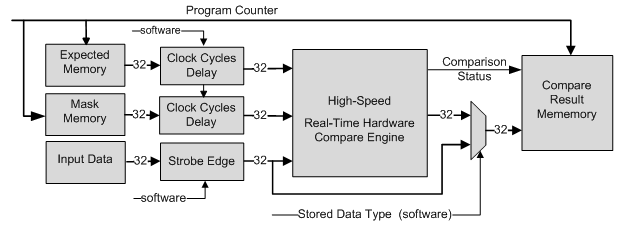
The GX5295 can operate in the drive / record or the High-Speed Real-Time Hardware Compare mode. The High-Speed Real-Time Hardware Compare mode provides users with the ability to perform on-the-fly comparison of acquired response data against expected data. All the data comparison is performed in hardware on a per-sample basis which significantly reduces the time required to unload and analyze the data. In this mode the output memory becomes the expected data memory, the input memory becomes the mask memory and there is an additional 1K of on-board memory for storing acquired data or compared results. For this mode of operation, input data does not get recorded to the input memory, instead the 1K of on-board memory is used to save compared data and to record program steps.
High-Speed Real-Time Hardware Compare Block Diagram
The Real-Time Hardware Compare consists of Expected memory, Mask memory and Direction memory. The Expected memory contains the expected known good data for each step. Note that the Expected memory is also used as the output memory for those test steps defined as outputs. Consequently, the Real Time Compare mode also provides drive / verify functionality – verifying a stuck at 0 or 1 condition at the UUT interface. The Mask memory contains the masking bits for the compare engine – instructing it to either ignore the data for the specified (logic low) step or to enable the compare engine (logic high). In case the mask was set to logic low the comparison result will be zero. The mask is applied to all channels for each step. The direction memory controls the direction of each channel on a per step basis. The comparison is made on per bit basis for all 32-bits of received data. The comparison results are saved to a dedicated on-board memory which can hold up to 1K of data. The result data has three components for each comparison result:
● Data: The user can set programmatically what type of data will be stored, either the comparison result or the actual (raw) received input data. If the stored result data type is the compared data, this data is the result of comparing the expected data with the received data on a per bit basis, with each bit ANDed with the mask data. A high bit in the mask will enable the comparison while a low bit will cause the comparison result to be logic low (indicating no failure). The comparison logic is defined as a Logic High being a failure while a Logic Low is no failure.
● Address: Contains the Program counter value.
● Comparison status: A single bit indicates the status of comparing all 32-bits for each step of the sequence. Logic high is a failure. This status bit is useful if the user programs the result data type to be the raw input data.
The user can set programmatically the Comparison stop mode for each DIO board in the domain. Each board can have a different stop mode. The comparison stop modes are follows:
● Stop on defined count errors: For this stop condition the board stops when the total number of failures (errors) is equal to the number of failures counted. If the number of detected failures is less than the defined count failures, the board will run to the end of the sequence. All boards in the domain will stop when any of the boards meet this condition..
● Stop on defined count of raw data: For this stop condition, the board is continuously comparing and recording the input data. The trigger for the board to stop is when the detected failures equal the number of defined number of failures. At that point the DIO will continue to record and compare data until there is no more room in the results memory. In this condition the result memory is operating like a FIFO until the stop condition is met. All boards in the domain will stop when any of the boards meet this condition.
● Stop on data: For this stop condition the board is continuously comparing and recording the input data. The trigger for the board to stop is when the input data is equal to the programmed comparison data value. At that point the DIO will continue to record and compare data until there is no more room in the results memory. In this condition the result memory is operating like a FIFO until stop condition is met. All boards in the domain will stop when any of the boards meet this condition.
● Stop on program counter: For this stop condition the board is continuously comparing and recording the input data. The trigger for the board to stop is when the program counter value is equal to the programmed counter data value. At that point the DIO will continue to record and compare data until there is no more room in the results memory. In this condition the result memory is operating like a FIFO until stop condition is met. All boards in the domain will stop when any of the boards meet this condition.
The user can set the condition value for the Comparison stop mode as follows:
● Failures count: maximum number of count failures is 1024.
● Vector data value.
● Vector step number.
The table below illustrates the real time compare result memory content, mask and expected memories for each state of received data (logic 0 and logic 1).
Expected |
Mask |
Received data |
Result Memory with Compare ON (High=Failure) |
Result Memory with Compare OFF |
X |
0 |
X |
0 |
0 |
0 |
0 |
|||
0 |
1 |
0 |
0 |
0 |
1 |
1 |
1 |
||
1 |
1 |
0 |
1 |
0 |
1 |
0 |
1 |
The comparison mechanism utilizes various data that is latched into the comparison engine on the fly. In order to help synchronize all of the different input data, there are several tools at the user’s disposal to help achieve overall synchronization of input and output data when operating in the Real-Time Hardware Compare mode. These tools are available only when operating in the RTC mode:
● Clock Cycles Delay: The user can set the number of clock cycles that the expected and/or the masked memory data require. Since each data path in the comparison process has its own delay this feature can be used to align the three different data sources - input data, masked data and expected data in order to ensure correct operation of the compare function.
● Input data strobe edge: The response data which is clocked in by the strobe is fed to the real time comparator using the same clock as the output data and the mask data. The user can set the input data (response data) strobe edge to either capture the input data on the falling or rising edge. This can assist in aligning the input data with the other two sources of data, the masked and expected memory data to ensure correct operation of the compare function.