 command. Selected channel(s) no longer display in Vector View.
Because CH10 - CH15 are not used by our vector, we can hide these channels to help reduce clutter on the Vector View display.
1. To hide one or more channels, select them by clicking a channel name in Vector View (for example, CH10). In the name column, drag the mouse over a group of channels to hide.
2. Select
Channel from the Main menu and
click the Hide
command. Selected channel(s) no longer display in Vector View.
3. To
redisplay a hidden channel, select Channel/Show  from the Main menu. A dialog box (figure below) displays. Viewable
channels display with a “+” and hidden channels display a “–“ in the State column. Select the channels
to display and click Show (multiple
selections are supported). The selected state(s) display “+”. Now click
OK. Selected channels that were
hidden now display in Vector View. Channels, which are selected but not
hidden, are unaffected.
from the Main menu. A dialog box (figure below) displays. Viewable
channels display with a “+” and hidden channels display a “–“ in the State column. Select the channels
to display and click Show (multiple
selections are supported). The selected state(s) display “+”. Now click
OK. Selected channels that were
hidden now display in Vector View. Channels, which are selected but not
hidden, are unaffected.
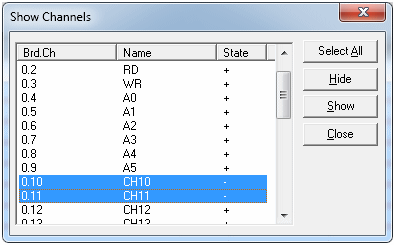
Show Channels Dialog Box