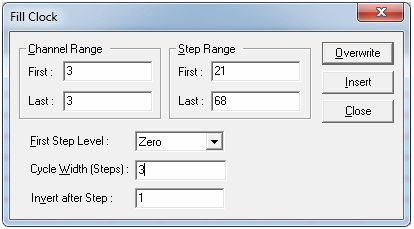
Steps 21 - 68 of Channel 3 have a repeating clock pattern of 0, 1, 1, 0, 1, 1, etc. The Fill Clock command can be used to write this pattern in one operation. To use the Fill Clock command:
1. Click on Fill and select the Clock command. The Fill Clock dialog box displays (figure below).
2. Select Channel Range (3 and 3) and Step Range (21 and 68).
3. Select Zero as the Start level.
4. Enter ‘3’ in the cycle width and ‘1’ in the invert after step.
5. Click Overwrite!
Fill Clock Dialog