 icon. The File Properties dialog box appears. Click the Setup tab.
The File Properties window contains all DIO board presets. Settings are loaded into DIO boards with the vector file.
On the Tool Bar, click the icon. The File Properties dialog box appears. Click the Setup tab.
Set DEvent register to 0. This register value is compared to the jump condition while running. If the UUT selects the first waveform, the WvFm line is low. When this is compared to the D register, a jump back is executed to the beginning of the waveform.
The target of the conditional/unconditional jump in Register B is step 4. To set the Register B content for the jump to step 4, type 4 in the Register B text box in the Registers group.
Set the Register A content to 520 the same way to implement an unconditional jump to the last step that ends the program. Step 520 executes the HALT command to ensure proper program termination.
Set the vector direction to output by selecting Output in the Direction group.
The File Properties window now looks like the figure below.
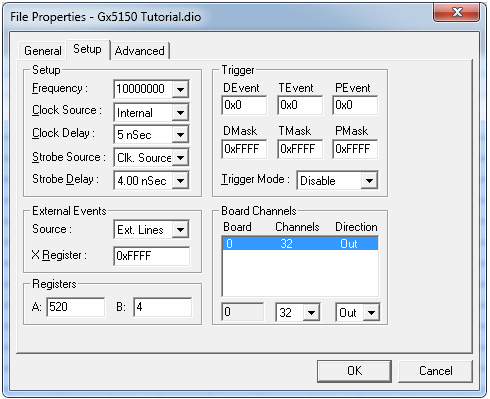
File Properties Window Displaying Setup Values
Click OK to apply changes and close the dialog box. Graticle lines now display as blue in Vector View, indicating the board outputs.