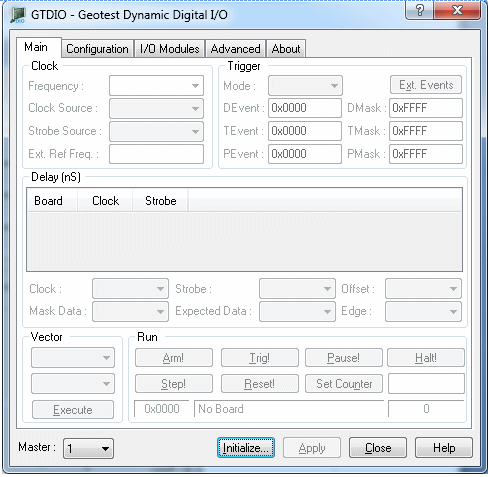
The GTDIO Panel displays the GTDIO – Dynamic Digital I/O window. This window is used to configure, initialize, load and save the vector file from/to the GTDIO circuit boards. It can be opened from a GTDIO Panel icon (links to 32-bit DIOPNL32.EXEor 64-bit DIOPANEL64.EXE), DIOEasy or by calling the DioPanel function.
The Panel window of the figure below, displays before the boards have been initialized and when Board Panel is selected in the Window menu, or when F10 is pressed. Fields are discussed below.
Panel not Initialized
Master Selection Combo Box: Select a Master board in the combo box. This identifies the domain. A domain board is configured using the Configuration Tab.
Initialize - initialize the board driver. The current settings of the selected counter will not change after calling initialize. The panel will reflect the current settings of the counter after the Initialize dialog closes.
Reset - resets the board settings to their default state and clears the reading.
Apply – applies changed settings to the board
Close - closes the panel. Closing the panel does not affect the board settings.
Help - opens the on-line help window. In addition to the help menu, the caption shows a What’s This Help button (?) button. This button can be used to obtain help on any control that is displayed in the panel window. To display the What’s This Help information click on the (?) button and then click on the control – a small window will display the information regarding this control.
The GTDIO virtual panel changes its appearance after initialization to fit the functionality of the initialized DIO family member.