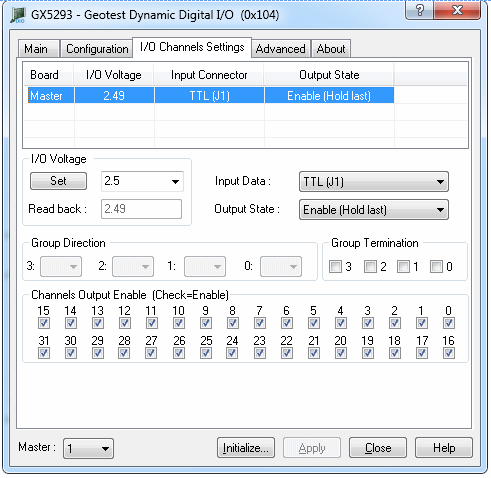
Clicking on the I/O Channels Settings Page tab (Gx5290/Gx5280 only) will show the I/O Channels Settings Page as shown in the figure below:
Virtual Panel –I/O Channels Settings Page
Board List: Displays/sets the current active board settings.
Input Connector (drop down list):
I/O Voltage group: Sets/Displays the I/O Voltage settings.
Group Direction: Sets/displays the direction for each group of 8-channels (enabled only for the Gx5280 boards).
Group Termination Sets/displays the on-board termination resistors for each group of 8-channels.
Channels Output Enable: sets/displays for each channels if its output is enabled or disabled.