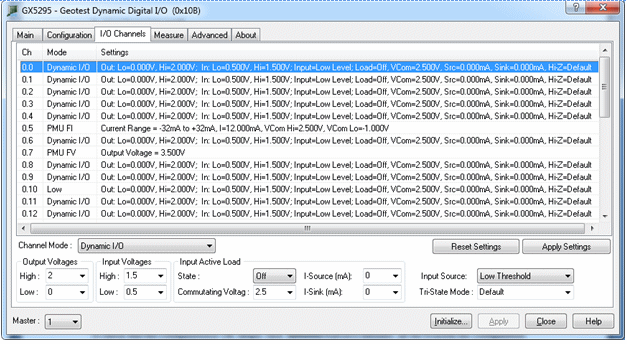
Clicking on the I/O Channels Page tab (Gx5290/Gx5280 only) will show the I/O Channels Page as shown in the figure below:
Gx5295 Virtual Panel –I/O Channels Page
Resets all settings (Button): Resets all settings back to default values
Apply settings (Button): Apply settings to the selected channels in the list control.
Channel Mode: Displays/set channel operating mode, modes are: Enabled (default operating mode) channel’s output is enabled. Disabled: channel’s output is disabled (Tri-State). Low: channel’s output is set to low; the output low voltage corresponds to the output low voltage settings. High: channel’s output is set to high; the output high voltage corresponds to the output high voltage settings. PMU FI: channel’s output is set to PMU (Parametric Measurement Unit) forced current mode. The channel’s forced current is set to zero. PMU FV: channel’s output is set to PMU (Parametric Measurement Unit) forced voltage mode. The channel’s forced voltage is set to zero volts.
High (Edit/ Listbox): Displays/set the channel output high voltage, voltage can be set from -2V to +7.0V and need to be higher than the output low voltage settings.
Low (Edit/ Listbox): Displays/set the channel output low voltage, voltage can be set from -2V to +7.0V and need to be less than the output high voltage settings.
Input voltage group:
High (Edit/ Listbox): Displays/set the channel input high threshold voltage, voltage can be set from -2V to +7.0V and need to be higher than the input low threshold voltage settings.
Low (Edit/ Listbox): Displays/set the channel input low threshold voltage, voltage can be set from -2V to +7.0V and need to be less than the input high threshold voltage settings.
State (Listbox): Displays/set the channel input active load state; the load state can be turned On or Off.
Commutating Voltage (Edit/ Listbox): Displays/set the channel input active load sink and source currents commutating voltages value, voltage can be set from --2V to +7V.
I-Source (Edit/ Listbox): Displays/set the channel input active load source current settings; source current can be set form 0 to 24mA.
I-Sink (Edit/ Listbox): Displays/set the channel input active load sink current settings; sink current can be set form 0 to 24mA.
Imput Source (Listbox): Displays/set the channel input data comparator source, Input data comparator can be as follows: Low Threshold Comparator: data will be the result of the comparison done on the input data by the low threshold comparator, logic levels are as follows: Logic Low: whenever the input signal is below the low comparator threshold Logic High: whenever the input signal is above the low comparator threshold High Threshold Comparator: data will be the result of the comparison done on the input data by the high threshold comparator, logic levels are as follows: Logic Low: whenever the input signal is below the high comparator threshold. Logic High: whenever the input signal is above the high comparator threshold.
Current Range(Listbox): Displays/set the channel PMU forced current value\n\rPMU forced current value depends on the current range settings PMU forced current range can as follows: -32mA to +32mA, -8mA to +8mA, -2mA to +2mA, -512uA to +512uA, -128uA to +128uA, -32uA to +32uA, -8uA to +8uA, -2uA to +2uA.
Current(Edit/ Listbox): Displays/set the channel PMU forced current value PMU forced current value depends on the current range settings PMU forced current range can as follows: -32mA to +32mA, -8mA to +8mA, -2mA to +2mA, -512uA to +512uA, -128uA to +128uA, -32uA to +32uA, -8uA to +8uA, -2uA to +2uA.
Commutating Voltage Hi (Edit/ Listbox): Displays/set the channel high commutating voltages value, voltage can be set from -2V to +7V. Each PMU has a set of programmable voltage clamps that limit the voltage swing when the PMU is forcing current. These clamps protect the DUT when current is being forced into a high impedance node at the DUT. If the sensed voltage exceeds the high or low voltage commutating the PMU reduces the output current in order for the output voltage to not exceed the clamp. If the voltage subsequently returns back to within the Commutating thresholds, the PMU resumes forcing the programmed current.
Commutating Voltage Lo (Edit/ Listbox): Displays/set the channel low commutating voltages value, voltage can be set from -2V to +7V. Each PMU has a set of programmable voltage clamps that limit the voltage swing when the PMU is forcing current. These clamps protect the DUT when current is being forced into a high impedance node at the DUT. If the sensed voltage exceeds the high or low voltage commutating the PMU reduces the output current in order for the output voltage to not exceed the clamp. If the voltage subsequently returns back to within the Commutating thresholds, the PMU resumes forcing the programmed current.
Voltage (Edit/ Listbox): Displays/set the channel PMU forced voltage value. PMU forced voltage value can be between -2V to +7V.