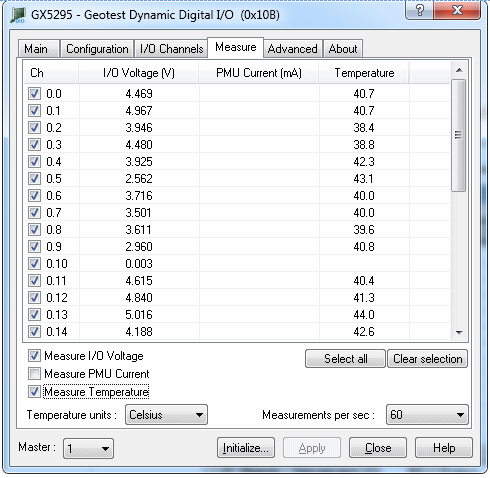
Clicking on Measure Page tab will show the Measure Page as shown in the figure below:
Gx5295 Virtual Panel – Measure Page
Temperatures group:
Measure (Check Box): When checked, start measuring channels temperatures; when unchecked stop all temperatures measurements. All temperatures measurements are automatically disabled when moving to another tab.
Rate (Listbox): Displays/set channels temperatures measurements rate in measurements per sec.
Units (Listbox): Displays/set channels temperatures units."
I/O Voltages group:
Measure (Check Box): When checked, start measuring channels I/O voltages, when unchecked stop all I/O voltages measurements. All I/O voltages measurements are automatically disabled when moving to another tab. All temperatures measurements are automatically disabled when moving to another tab.
Rate (Listbox): Displays/set channels I/O voltages measurements rate in measurements per sec.
PMU Curretns group:
Measure (Check Box): When checked, start measuring channels PMU currents, only for those channels which are set to be in PMU Forced Current Mode. When unchecked stop all currents measurements. All measurements are automatically disabled when moving to another tab.
Rate (Listbox): Displays/set channels PMU forced measurements rate in measurements