The High Power Chassis Page is visible only if there is a Gx5055 board in the chassis and the chassis is a Marvin Test high power chassis.
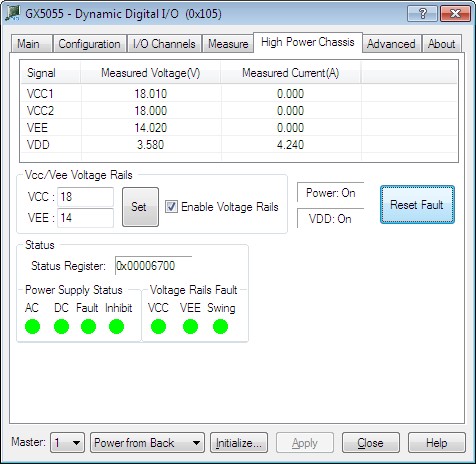
Clicking on High Power Chassis Page tab will show the Gx5055 High Power Chassis Page as shown in the figure below:
Gx5055 Virtual Panel –High Power Chassis Page
The following controls are shown in the High Power Chassis Page:
Signal List (ListControl): Displays the VCC1, VCC2, VEE, and VDD measured voltage and measured currents.
Vcc/Vee Voltage Rails (GroupBox):
VCC (EditBox): Sets/displays the VCC voltage.
VEE (EditBox): Sets/displays the VEE voltage.
Set Button: Sets both VCC and VEE specified voltages.
Enable Voltage Rails (CheckBox): When checked, the Vcc and Vee voltage rails are enabled.
Power: On status: Displays the Power supply state.
VDD: On status: Displays the VDD voltage rail state.
Reset Fault (Button): When pressed it will clear all pending power supply faults, disable both Vcc and Vee voltage rails.
Status (GroupBox):
Displays the power supply different components status.