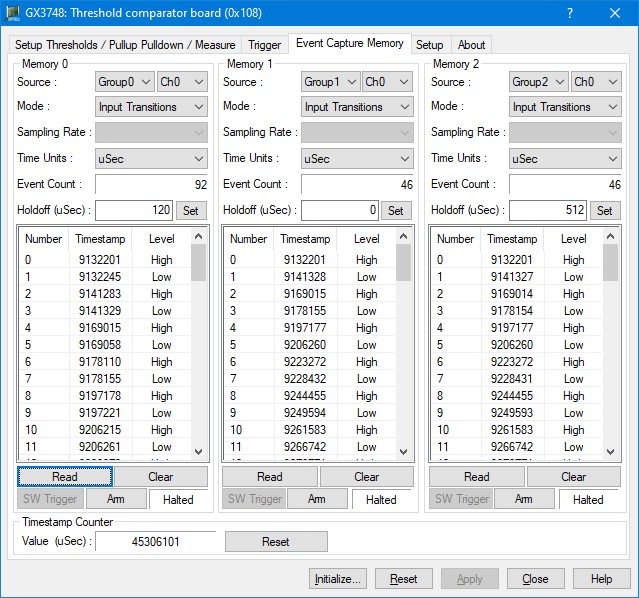
After the board is initialized, the panel is enabled and will display the current setting of the board. The following picture shows the “Event Capture Memory” page settings:
GX3748 Virtual Panel – Event Capture Memory page
The following controls are shown in the “Event Capture Memory” page:
Memory 0, Memory 1 and Memory 2 Group Box:
Source dropdown list: Sets/display the memory event capture group and channel. Groups are 0-2, and channels are 0-15.
Mode dropdown list: Sets/display the memory event capture mode, modes are Input Transitions or Continuous.
Sampling Rate dropdown list: Sets/display the memory event capture sampling rate when in continuous mode. Sampling rates are: 1 uSec, 2 uSec, 4 uSec, 8 uSec, 16 uSec, 32 uSec, 66 uSec, 128 uSec, 256 uSec, 512 uSec, 1024 uSec, 2048 uSec, 4096 uSec, 8192 uSec, 16384 uSec, and 32768 uSec.
Time Units dropdown list: Sets/display the memory event capture time units to be display as, units are: uSec, mSec and Sec.
Event Count static text: Display how many events were captured by the specified memory.
Read button: Will fill the memory event capture list with time stamps and logic levels at those time stamps.
Clear button: Clear all the specified event memory capture list.
SW Trigger button: Enabled only if the mode was set to continuous, will generate a software trigger to start recording.
Halt/Arm button: Will halt and disable the specified memory from capturing any additional events.
Halt/Arm static text state: Display the specified memory operation mode, either is Halt or Arm mode.
Timestamp CounterGroup Box:
Value (uSec) static text: Display the running time stamp clock value in 1uSec resolution.
Reset button: Will reset the running time stamp clock to 0, the clock will immediately start counting again.