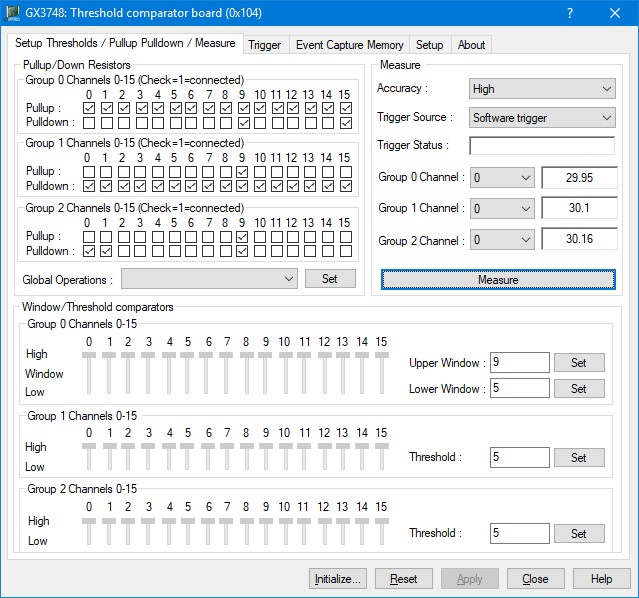
After the board is initialized, the panel is enabled and will display the current setting of the board. The following picture shows the Setup Thresholds /Pullup Pulldown/Measure page settings:
GX3748 Virtual Panel – Setup Thresholds/Pullup Pulldown/Measure page
The following controls are shown in the Setup Thresholds/Pullup Pulldown/Measure page:
Pullup/Down Resistors group box:
Contains check box to connect/disconnect the pullup/pull down resistors as described below.
Group 0 Channels 0-15 (Check=1=connected) group box: Sets/displays group 0 channels 0-15 pullup/pull down resistors' states.
Group 1 Channels 0-15 (Check=1=connected) group box: Sets/displays group 1 channels 0-15 pullup/pull down resistors' states.
Group 2 Channels 0-15 (Check=1=connected) group box: Sets/displays group 2 channels 0-15 pullup/pull down resistors' states.
Global Operations drop-down box: Allow the user to set multiple resistors at once.
Window/Threshold comparators group box:
Group 0 Channels 0-15 group box:
Group 0 channels 0-15 comparators state, Low. Window and High.
Upper Window edit box: Sets/displays the upper window comparator voltage.
Set button: Apply the upper window comparator voltage edit box value.
Lower Window edit box: Sets/displays the lower window comparator voltage.
Set button: Apply the lower window comparator voltage edit box value.
Group 1 Channels 0-15 group box:
Group 1 channels 0-15 comparators state, Low and High.
Threshold edit box: Sets/displays the threshold comparator voltage.
Set button: Apply the threshold comparator voltage edit box value.
Group 2 Channels 0-15 group box:
Group 2 channels 0-15 comparators state, Low and High.
Threshold edit box: Sets/displays the threshold comparator voltage.
Set button: Apply the threshold comparator voltage edit box value.
Measure group box:
Accuracy drop down list: sets/display the measurements accuracy level, Low, medium, and high.
Trigger Source drop down list: sets/display the measurements trigger source, options are: Software trigger, PXI Trigger Bus 0, PXI Trigger Bus 1, PXI Trigger Bus 2, PXI Trigger Bus 3, PXI Trigger Bus 4, PXI Trigger Bus 5, PXI Trigger Bus 6, PXI Trigger Bus 7.
Group 0 Channel drop down list: sets/display the channel in group 0 to take measurements from, channel can be 0-15. The measurement is displayed next to the selected channel.
Group 1 Channel drop down list: sets/display the channel in group 1 to take measurements from, channel can be 0-15. The measurement is displayed next to the selected channel.
Group 2 Channel drop down list: sets/display the channel in group 2 to take measurements from, channel can be 0-15. The measurement is displayed next to the selected channel.
Measure button: takes measurements.