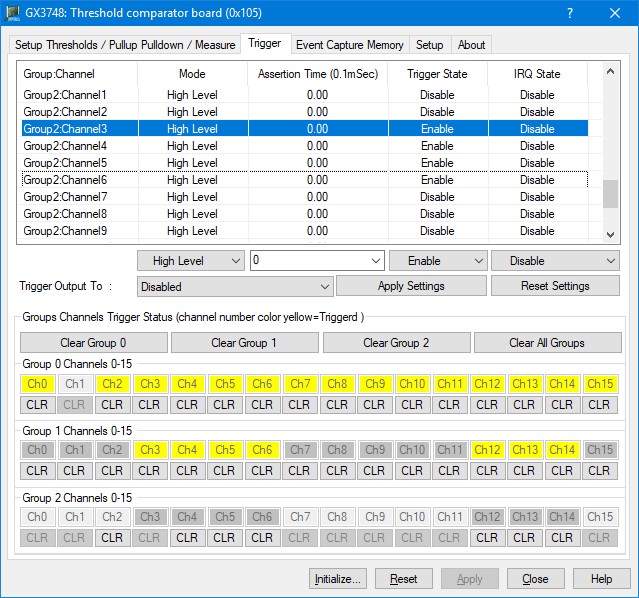
The following picture shows the Trigger page settings:
GX3748 Virtual Panel – Trigger page
The following controls are shown in the Trigger page:
Group and channels trigger list control:
Sets/display all the groups’ channels ‘trigger mode, trigger mode can as follow: High Level, Low Level, Rising Edge, and Falling Edge.
Assertion time (with 0.1 mSec resolution): sets/displays the trigger assertion time per channel, range is 0 mSec to 6553.6 mSec.
Trigger State: sets/displays the trigger state, enable or disabled.
Trigger IRQ: sets/displays the trigger IRQ state, enable or disabled.
Trigger Out to drop down list: Sets/display the PXI trigger that any generated trigger will output to the PXI bus. Sections are: Disabled, PXI Trigger Bus 0, PXI Trigger Bus 1, PXI Trigger Bus 2, PXI Trigger Bus 3, PXI Trigger Bus 4, PXI Trigger Bus 5, PXI Trigger Bus 6, PXI Trigger Bus 7.
Apply settings button: Apply the settings to all selected channels.
Reset Settings button: Sets all 48 channels’ trigger settings back to default.
Groups Channels Trigger Status (channel number color yellow=Triggered) group box:
Group 0 Channels 0-15: sets/display the trigger settings of each channel in the group. If channel trigger and/or IRQ are enabled than the channel is enabled. If the channel number background is yellow, that means that a trigger occurred on that channel. The user can then click the CLR button to clear the trigger.
Group 1 Channels 0-15: sets/display the trigger settings of each channel in the group. If channel trigger and/or IRQ are enabled than the channel is enabled. If the channel number background is yellow, that means that a trigger occurred on that channel. The user can then click the CLR button to clear the trigger.
Group 2 Channels 0-15: sets/display the trigger settings of each channel in the group. If channel trigger and/or IRQ are enabled than the channel is enabled. If the channel number background is yellow, that means that a trigger occurred on that channel. The user can then click the CLR button to clear the trigger.