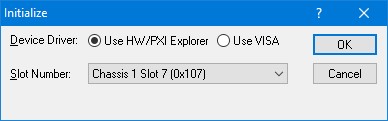
The Initialize dialog initializes the driver for the selected counter board. The counter settings will not change after initialize is called. Once initialize, the panel will reflect the current settings of the counter.
The Initialize dialog supports two different device drivers that can be used to access and control the board:
1. Use HW/PXI Explorer – this is the device driver installed by the setup program and is the default driver. When selected, the Slot Number list displays the available counter boards installed in the system and their slots. The chassis, slots, devices and their resources are also displayed by the HW resource manager, PXI/PCI Explorer applet that can be opened from the Windows Control Panel. The PXI/PCI Explorer can be used to configure the system chassis, controllers, slots and devices. The configuration is saved to PXISYS.INI and PXIeSYS.INI located in the Windows folder. These configuration files are also used by VISA. The following figure shows the slot number 0x107 (chassis 1 Slot 7). This is the slot number argument (nSlot) passed by the panel when calling the driver Gx3748Initialize function used to initialize driver with the specified board.
Initialize
Dialog Box using Marvin Test Solutions’ HW driver
2. Use VISA – this is a third-party device driver usually provided by National Instrument (NI-VISA). When selected, the Resource list displays the available boards installed in the system and their VISA resource address. The chassis, slots, devices and their resources are also displayed by the VISA resource manager, Measurement & Automation (NI-MAX) and in Marvin Test Solutions PXI/PCI Explorer. The following figure shows PXI5::10::INSTR as the VISA resource (PCI bus 5 and Device 10). This is VISA resource string argument (szVisaResource) passed by the panel when calling the driver Gx3748InitializeVisa function to initialize the driver with the specified board.
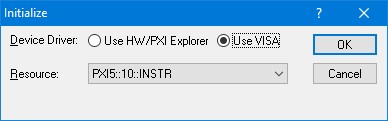
Initialize Dialog Box using VISA resources