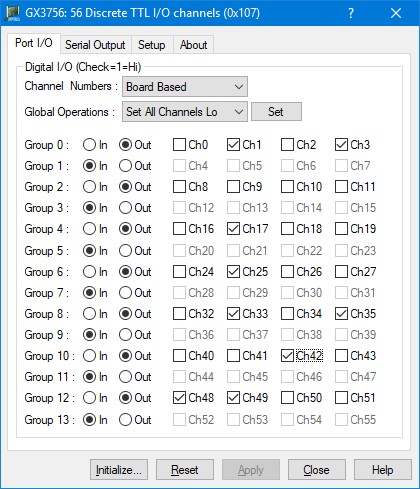
After the board is initialized, the panel is enabled and will display the current setting of the board. The following picture shows the Port I/O page settings:
GX3756 Virtual Panel – Port I/O page
The following controls are shown in the Port I/O page:
Digital I/O (Check=1=Hi) Group Box:
Channel Numbers List: Sets/displays the Port I/O channel numbering convention, selections are Board Based and Group Based.
Global Operations List: applies the selected operation on the Sets the Port I/O channels, selection are: Set All Channels Lo, Set All Channels Hi, Set All Channels In, Set All Channels Out, Reset Group 0, Reset Group 1, Reset Group 2, Reset Group 3, Reset Group 4, Reset Group 5, Reset Group 6, Reset Group 7, Reset Group 8, Reset Group 9, Reset Group 10, Reset Group 11, Reset Group 12, and Reset Group 13.
Group 0 - Group 13: Sets/displays the 14 Port I/O groups
In/Out radio button: Sets/displays the specific group’s programmed direction.
Ch0- Ch55 check box: Sets/displays the specific channel logic level, 0=Logic low, 1=logic high.